My Ergonomic Digital Nomad Setup: Split Keyboard & Trackball
Discover my ultimate ergonomic portable setup for digital nomads. Work comfortably from anywhere with a split keyboard, trackball, and a single backpack.
Key Takeaways
- Prioritize a comfortable backpack over desk gear, as shoulder fatigue can negatively impact your entire work session before it even begins.
- Elevating your laptop screen to eye height using a compact riser like the Majextand is crucial to prevent neck strain during long work periods.
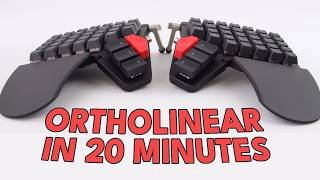
- A wireless split ortholinear keyboard allows for natural hand placement and shoulder width, preventing shoulder strain common with laptop keyboards.
- Custom 3D-printed cases and portable magnetic stands enable easy and secure transport and deployment of a full-sized ergonomic keyboard.
- A trackball mouse is superior to a traditional mouse for mobile setups due to limited coffee shop table space and inconsistent surfaces.
- Choosing a laptop that wakes instantly and has long battery life, like the MacBook Air M1, is essential for seamless and stress-free mobile work sessions.
Need to Complete High-Quality Creative Work Fast?
We're obsessed with making tools that help you FLY THROUGH your creative work! If you want to produce more quality creative work then you ever have before, then drop your email below and get exclusive first access to new products we launch, at HUGE discounts, all dedicated to helping you Complete Creative Work Faster
Full Transcript
Something hurt every time. I used to come home from coffee shop work sessions with my neck sore and my shoulders tight. Every time. And I’d think this is just what working from a laptop feels like outside the house. It took me about two years, a handful of failed gear experiments and a 3D printer to figure out that it doesn’t have to be.
This is everything I carry in a single backpack to work comfortably from any coffee shop, any table, anywhere. And I want to walk through each piece because every single one is here for a specific reason. Something hurt without it. But before I get to the keyboard and the trackball and all the fun stuff, I need to start with the piece nobody ever talks about in setup videos. It starts with your shoulders.
The first piece of ergonomic gear in my mobile kit isn’t a keyboard or a screen riser. It. It’s this bag. I used to carry a tonbin synapse 25, which I actually have right here. It’s nice, bit dusty.
I still use the Tom Bin laptop sleeve and the organizer pouch from it because they’re excellent. But the straps on that bag would fatigue my shoulders within about 20 minutes of walking. I’m a wider than average guy and a lot of bag straps just don’t sit right on me. They cut in at awkward angles across my upper back, and by the time I sat down to work, I’d already feel tight and tired, which is a strange way to start a work session. The bag I switched to is the Choiun Tactical CT10 version 2.
It’s a Vietnamese made tactical backpack, kind of a more affordable take on the Goruk bags, which are just out of what I’m willing to spend. But the thing that sold me is the straps. They’re thick, padded, almost kind of fluffy. The whole bag just sits on my back without digging in anywhere. At 10L and using Cordura 1000D construction, it’s compact enough for coffee shop carry, but fits every piece of gear I’m about to show you.
I’ve essentially permanently allocated this bag to my mobile work kit. Always packed, always ready to grab. Here’s what I learned. If your bag is fatiguing your shoulders before you even sit down, you’re starting every work session at a physical disadvantage. The most underrated piece of ergonomic gear doesn’t sit on your desk.
It sits on your shoulders. Okay, your bag is comfortable. You’ve arrived at the coffee shop feeling good. You open your laptop on the table and immediately tilt your neck down to look at the screen. This is the single Biggest ergonomic problem with laptop work.
The screen is just too low. And if you work like this for three, four, five hours, your neck will let you know. I’ve tried a few solutions for this over the years. My previous laptop had a moft adhesive riser on the back. Same concept as what I use now.
It sticks to the laptop, folds out, but the moft just didn’t get the screen high enough for me. Better than nothing, definitely, but not really where I wanted it. I’ve also used the neck stand, which is a portable folding stand that gets excellent height. I think the official version of that is called the Rooster Stand. I think that was the original design, but it’s another device to carry, and it takes up more table space than you’d first think on a smaller coffee shop table.
That real estate really matters. What I use now is the Magec stand. It’s a metal riser that adheres to the bottom of your laptop. And this thing is thin. We’re talking 1.7 millimeters thin.
You flip it out and it gives you six adjustable height settings, getting your screen significantly higher than the moft ever could when it’s folded flat. The Magec stand comes with these replacement foot stickers that sit over your regular laptop feet, so you actually get a little extra lift and grip when the riser isn’t deployed. All of these adhesive stands add a little wobble to your laptop when you use it flat, but the Magec stand’s foot stickers make it pretty reasonable. If you’re in the US or Europe, you can grab one easily on Amazon or Newegg. I had to order mine through AliExpress since they’re harder to find where I live, but worth the wait.
Quick note on the laptop itself. I use a MacBook Air M1 base model, 8 gigs of RAM. Yes, 8 gigs. I was too cheap to upgrade at the time, and I’ve made my peace with that. I’ve actually used Claud code to optimize the system to sip RAM as efficiently as possible.
And it still handles web development, writing and coding sessions without complaints. But the real reason this laptop works for mobile is simpler than specs. It wakes from sleep instantly. The battery gives me four to six hours of real work at a coffee shop without needing a charger. And it’s light.
My previous laptop was a ThinkPad X1 carbon running Fedora Linux. I love that machine at my desk. Built in HDMI Thunderbolt, extremely expandable. But for mobile work, the battery would die at around two and a half to three hours sleep mode would drain about 15% every 30 minutes. And sometimes the laptop would actually wake up inside my backpack.
I’d pull it out and the fans would be running and the thing was just really hot. I ended up just shutting it down completely every time I packed up, which meant waiting for a full boot at the next coffee shop. I also saved everything carefully before I left because if the battery died in transit, I might lose work. The the MacBook just doesn’t have those problems. A 1.7 millimeter riser and an instant wake laptop that lasts all day.
That’s the foundation everything else is built upon. Now here’s where things get interesting at coffee shops. Your screen is up at eye height. Great. But your hands are still pinched together on the laptop keyboard, shoulders rolled inward.
If you type like that for hours, you’re trading neck pain for shoulder strain. And this connects to something I haven’t mentioned yet, which is whether you actually need everything I’m about to show you. I’ll get to that, but first let’s get to the keyboard. I went through a bunch of options trying to solve this. I used to bring a Lenovo ThinkPad compact keyboard, basically an exact replica of the X1 carbon keyboard I loved.
Great feel, but it wasn’t optimized for Mac, so I had electrical tape over certain keys to stop myself getting confused. It also wasn’t split, and after long sessions I’d still have that shoulder tightness. Then I tried the epomaker split 65, which I actually still like. Split design, good price, but it was just too thick and too heavy to justify the backpack space. And by this point I was going all in on ortholinear layouts, so the staggered rows started to feel just a bit wrong.
What I carry now is a Panda KB with wireless softle chock. It’s hot swap low profile. I run Kailh deepsea low profile switches in mine which are virgin two chocks that are silent and tactile so you feel a little feedback on each key press. Once you’ve typed on those for a while, going back to anything clicky or scratchy just kind of feels a bit off. The keycaps are taiho tht low profile fins which have a surprisingly nice feel for the price.
The keyboard itself does have some weak points. The little screen could be better built. The battery is a bit small, but for what it needs to do on the road, it gets the job done. The real trick is how it travels. Someone had designed a 3D printable case for a single half Of a low profile software keyboard, but it didn’t quite fit my exact board.
So I tweaked the dimensions in my slicer software and and turned it into one larger case that fits both keyboard halves together. The main job of this case is protecting the switches and keycaps from getting banged around in my backpack, Especially on days when I’ve got groceries crammed in there too. For tenting at the coffee shop, I use two Camelo magnetic phone tripod stands. They fold down small and I carry them in a little pouch. Each stand has three adjustable legs that give a wide enough base to stay stable with on the table without taking up too much space.
Stick the keyboard halves on with the adhesive magnetic rings, dial in the tenting angle, and you’ve got a full split orphilinear keyboard setup deployed at a coffee shop table. A wireless split keyboard packed in a custom case you tweaked yourself that deploys on magnetic stands and travels in your backpack like a paperback book. You don’t have to give up your preferred layout, your silent switches, or your shoulder width just because you left the house. So your screen is at eye height. Your keyboard is split and tented.
There’s one more input device that ties this all together. A regular mouse at a coffee shop is a real hassle. You need room to move it around, and you need a smooth surface for consistent tracking. Coffee shop tables aren’t always big and they aren’t always smooth. I used to carry an Elekom Bitra Trackball, which is a great little device overall, but.
But it had this maddening issue on Mac OS where the cursor would randomly skip across the screen. I spent time trying to diagnose it. Different settings, different software fixes. Eventually I just got too frustrated and I switched. The Logitech Ergo M575 was my first thumb trackball, and honestly, the switch was easier than I expected.
It’s accurate. The battery lasts what feels like forever on a single AA battery, and it just works every single time. After the Bitra experience, just works became the entire requirement. I3D printed a small tenting stand for it so it sits at a comfortable angle on the table, and I’ve got a cheap carry case to keep it protected in the bag. A trackball needs no mousepad, no desk space to move around, and works on literally any surface you set it on with the tenting stand.
It’s more ergonomic sitting on a coffee shop table than than most people’s mice on the actual desks at home. Do you actually need all of this. So let me put this all together. I grabbed a CT10 backpack, which is always packed and ready. I get to the coffee shop, find a table.
The whole setup Deploys in about 2 minutes. Laptop open, Magec stand flipped out. Keyboard halves on their Camolo stands, Trackball on its tenting stand. Bluetooth connects and I’m working web development writing code sessions the same work I do at my home desk. I just do it somewhere different.
Four to six hours later I pack up and I go, usually without ever plugging in the charger. Now I realize this might look like a lot of gear, and it is. This setup evolved over a couple of years of trying things, returning things, and 3D printing things that didn’t exist yet. So here’s what I actually want to leave you with. You don’t need all of this if you want to start working more comfortably away from your desk.
Here’s the simple version. A laptop stand, even the neck stand. For around $30. Get your screen up. A mouse or trackball you already own.
If you want a good portable mouse, the Logitech G304 is cheap, lightweight and has a great sensor that works on most surfaces. For keyboards, the Keychron B1 Pro is solid if you want thin scissor switches it epomaker split 65 if you want to go split or a budget. So corn build from AliExpress if the awful linear world is calling you. And for a bag, Muji and Uniqlo both make surprisingly well built backpacks for not much money at all. The point isn’t matching my exact setup.
The point is making wherever you work feel intentional because your body doesn’t care whether you’re at home or or a coffee shop. Something will hurt either way if you don’t think about it. And once you do think about it, once you solve each of those little pain points one at a time, you end up with a mobile setup that doesn’t ask you to compromise. That’s what stopped hurting. Speaking of intentional tools, over at InputZen we are building something called the BuildBox.
It’s a Macropad designed to help you complete creative work faster. If portable, deliberate tools are your thing, there’s a link in the description with everything we’ve got on it so far. If you’re into ergonomic setups, split keyboards, or just optimizing how you work, there’s more coming. Click subscribe if that’s your kind of thing. And until the next video, stay Zen.
Sam.
Related Links
As an Amazon Associate I earn from qualifying purchases.