
Powerful Shortcuts For Your Favorite Apps
The BuildBox Macropad lets you dedicate every key, button and scrollwheel twist to multi-step actions, shortcuts or automations for any application you use
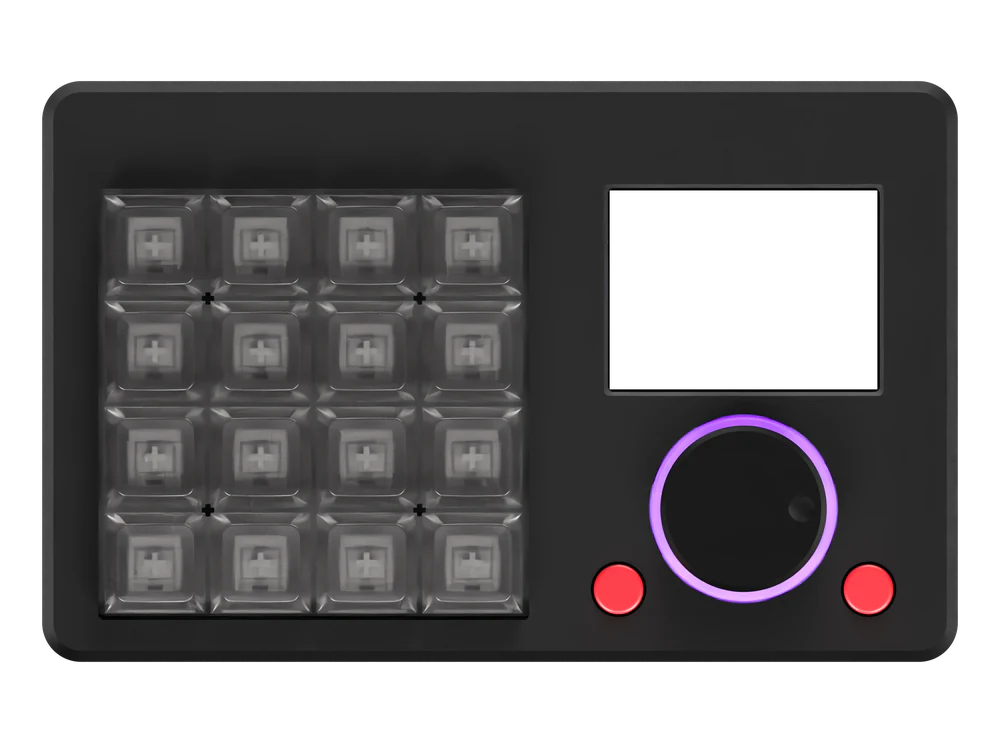
 WIN/MAC/LINUX COMPATIBLE16 KEYS/UNLIMITED LAYERSOLED SHORTCUT DISPLAYFRICTIONLESS SCROLL WHEEL

What Makes The BuildBox The Ultimate Shortcut Machine?
The BuildBox is our unique take on a macropad. If you've never heard of a macropad, think of it as a 'mini keyboard' but instead of each key entering a letter/number, it activates a shortcut, or an automation, a key combo or even an entire script; and you can configure it all!
Here's some other BuildBox features...
How Will You Configure Your BuildBox?
Stop finger-twisting to use keyboard shortcuts with your apps.
Try it out! Pick an app, then hover or clicktap a key to see what it does:
Choose Your Application
1 Key Multi‑Step Shortcuts For Any App
The BuildBox lets you run pre-built multi-step automations for 100s of apps every time you press one of the keys, or design your own custom shortcuts in our easy shortcut builder

Unlock Precision Control & Lightning Fast Shortcuts for All Your Key Apps
The BuildBox Macropad is launching early November at a discount launch-only price for the first 200 customers. Want to get your dream shortcut macropad, with an OLED shortcut display, zero-friction scrollwheel, 16 keys/unlimited layers, Windows/Mac/Linux compatibility and a huge library of prebuilt shortcuts & automations or unlimited ability to add your own?
Pixel-Perfect Scrolling Using Magnets
The BuildBox scroll wheel uses a magnetic sensor that reads 4096 positions per rotation, so every twist, nudge and slow adjustment is tracked finer than a single pixel. The scroll wheel is fully configurable. Need to effortlessly glide through large documents? Want to accurately scrub backwards and forwards while editing videos, animations, 3D design or music files? Or you can control your favorite media player or website; the BuildBox frictionless scroll wheel brings high-res scrolling to all of your favorite apps


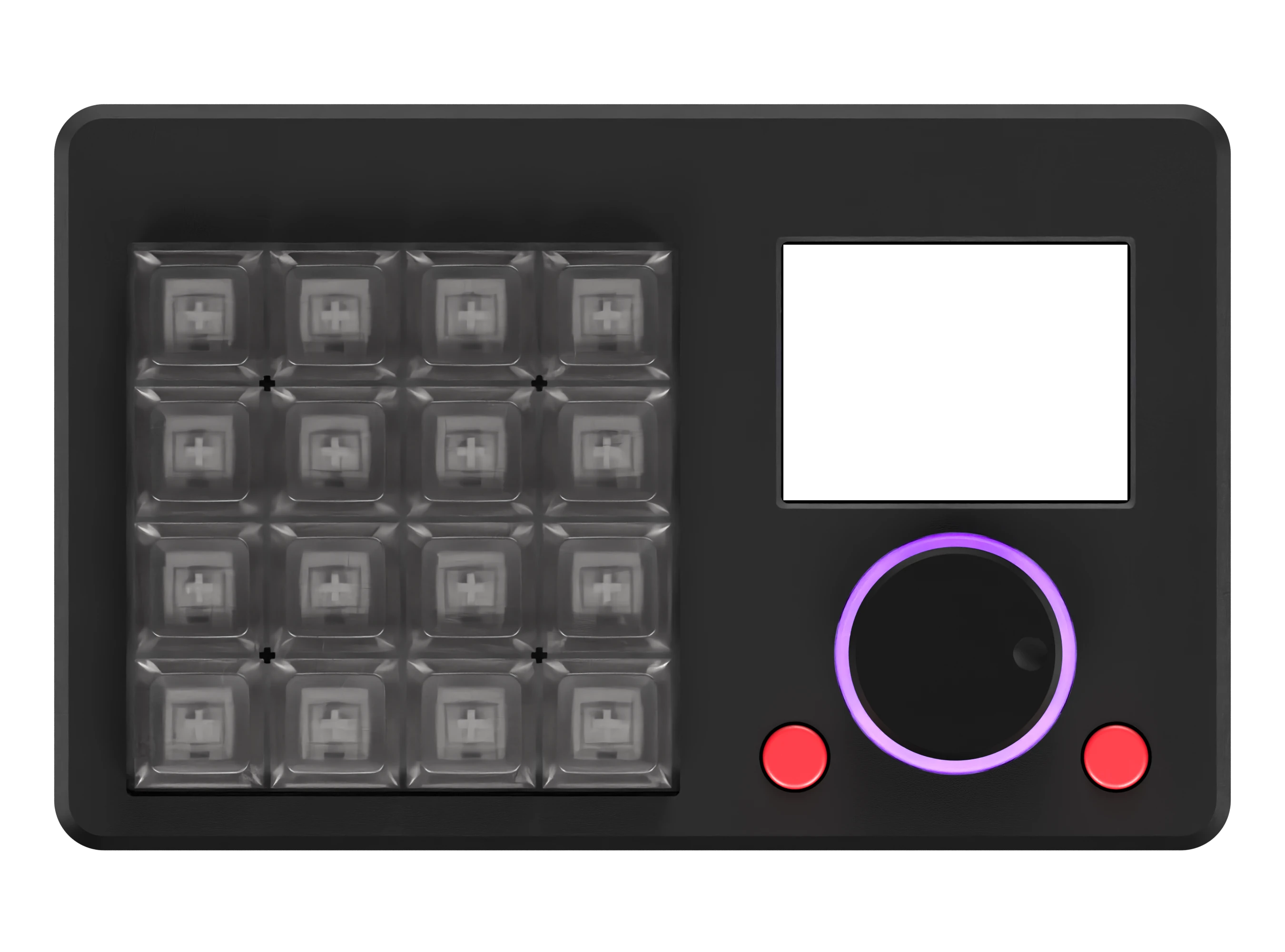
Huge Screen Means No More Memorizing
When in a flow state, the last thing you want is to interrupt your deep work or creative session by pausing and remembering where the specific key you need is located. That's why we developed the BuildBox around a full color 2.4" screen that clearly shows you every function available at a single glance. The screen is 100% customizable with several themes and color schemes available and pre-loaded on the BuildBox Macropad.
Settings Stored On-Device And Compatible With Any OS
Our team all use different operating systems so we made sure that the BuildBox works perfectly on Windows, MacOS and Linux computers. And because we often switch between different computers and wanted to make sure that we could take our BuildBox Macropad with us, we made sure that all settings and shortcuts are stored on the BuildBox itself, so you can plug-in and go on new computers without reconfiguring anything or installing new background companion software each time.

I never had enough time to complete all the work on my plate…
So I decided to take Shortcuts
I'm Lewis, and as a kid I was always told “don't take shortcuts.”
I didn't listen — instead I built the Ultimate Shortcut Machine to help me complete my creative tasks faster!
In 2 decades of creative work & building, I could see how capable I was, but my to-do list was always backed-up and full of repetitive, tedious work. Editing videos or working front end dev or design tasks, I would think “there must be a better way to do this?”
I developed a library of scripts and keyboard shortcuts for my most used applications, and initially used a USB numberpad to assign these ‘one-click-workflows’ and shortcuts to different key presses. That rough ‘shortcut box’ evolved into our full-featured dream macropad: The BuildBox! Launching early November...
Frequently Asked Questions
Who is The BuildBox Macropad For?
We created the BuildBox because day-to-day work at our computers had us repeating workflows over and over again, every single day! These repetitive workflows add up: switching between applications, moving windows, selecting and copy/pasting, cutting and applying effects to multimedia in editing apps, repeatedly entering and altering code, making design tweaks to websites and apps you're developing, even interacting with your chosen AI interface.
Initially we created a bunch of shortcut scripts that could be activated from the terminal/command line or with a 3-4 finger keyboard shortcut, and then we moved activation of these shortcut scripts to keys on re-purposed numberpads because the 'finger gymnastics' became too much. This led to our discovery of the macropad concept, and we built out the BuildBox to be our ideal version of a macropad keyboard.
We think the BuildBox belongs on the desk of anyone who wants access to shortcuts and automations that save them from repeated workflows every day, meaning they can lock-in and stay focused on the high level work that matters. Video producers and editors, graphic designers and front end/UI/UX developers, programmers, creatives, knowledge workers and entrepreneurs/'digital builders' can all benefit from having a BuildBox on their desk. The BuildBox Macropad is for all of us who want to create more, create faster and create without the friction and bottlenecks that get in the way of deep focus!
What Operating Systems (OS) does the BuildBox work with?
The BuildBox Macropad is fully compatible with MacOS, Windows & Linux operating systems. This is mostly thanks to our VIA/QMK compatibility, which is fully compatible with all 3 operating systems, but we have done extensive work with our own configuration interfaces to make sure everything works smoothly no matter what your OS!
What Applications can I use the BuildBox for?
The BuildBox Macropad can be configured to work for any application that you can configure keyboard shortcuts for, and even if there are no keyboard shortcuts for your chosen app (search our keyboard shortcuts database to see if any exist first), we have extensive documentation and tools to help you quickly get your favorite app working.
Do I need to install and keep running any software?
We have made sure that the BuildBox Macropad is plug-and-play for typical operation, and there is no requirement to run 'companion' software or resource-hungry background apps just so the device works. Note: you may need to run applications to configure the functions and keys of your BuildBox Macropad, but that is only when you want to change any of the configs beyond what's available on the device, all your chosen settings and configs are then stored on the device so you can plug and go.
When will I receive my BuildBox Macropad?
The BuildBox Macropad is available for early-access sale at the beginning of November 2026. If you'd like to be first in line to order and receive your BuildBox (and get access to a sweet launch discount) then sign up for notifications here and get alerted as soon as we are live.
InputZen Updates
Keep up to date with all the latest content from InputZen...



Bring Ultra-Fast Shortcuts to Any App With the BuildBox Macropad
Final beta tests for the BuildBox Macropad are happening now and then we'll launch a limited run of 200 units in November.
Launch BuildBox units come with exclusive FREE accessories like our wrist rest and custom travel case plus a BIG discount on RRP!
Enter your email to get your hands on a launch batch BuildBox:
You're on the list!
We'll be in touch when it's time. Keep building.