Why Ortholinear Keyboards Are So Effective
Discover the ergonomic and efficiency benefits of an ortholinear split keyboard, featuring an innovative 3D-printed design with a built-in laptop stand.
Key Takeaways
- Ortholinear split keyboards with minimalist key counts, like 36-key designs, significantly reduce finger travel and improve typing efficiency.
- Integrated trackpoints in keyboards offer a convenient alternative to a mouse for small, precise cursor movements without repositioning your hand.
- Custom 3D-printed keyboard cases can intelligently double as laptop stands, improving screen ergonomics for portable setups.
- Open-source keyboard projects allow for community collaboration and innovation in ergonomic design.
- The 'PSKEB' series highlights portability and efficiency, using a modular split design that stacks for travel and emphasizes home row typing.
- Minimizing keys to what fingers can comfortably reach, combined with layers and 'home row mods,' can be more efficient than traditional layouts.
Need to Complete High-Quality Creative Work Fast?
We're obsessed with making tools that help you FLY THROUGH your creative work! If you want to produce more quality creative work then you ever have before, then drop your email below and get exclusive first access to new products we launch, at HUGE discounts, all dedicated to helping you Complete Creative Work Faster
Full Transcript
Foreign.
So this one’s interesting because it’s seems to be just this custom project which is made by this guy called Tinker and Hack. He seems, I think he has his own YoYouTube channel. I think I found his like GitHub project as well. And he’s kind of building this out. This whole little project he’s building out, it’s all open source.
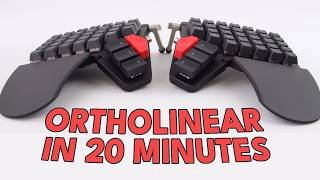
And this is like a custom ortholinear split keyboard. It’s called the PSKEB. PSKEB. And it’s a custom made 3D printed case. And the case also acts as a, like a laptop stand, which I thought was really clever.
I saw this and I was like, oh, if this wasn’t a three row or four row design, if this was like, you know, a regular four, four, five row case keyboard, I might try and build this. This is interesting. They’re talking my language here. So yeah, this seems to be an interesting little project this guy’s building out here. And I love that it’s all open source.
Yeah, let’s check out also. Yeah, he also has a track point, the little red nub that you see there. He has that built into the keyboard, which is genius because those track points, they come by default on the ThinkPad laptops, the Lenovo ThinkPad laptops. And while they’re not, they’re not, in my opinion, they’re not the perfect like mouse pointing device. I know there’s a lot of like ThinkPad fanboys who love them.
They’re like, oh, it’s the best mouse ever made. I don’t. They’re not, in my opinion, they’re just not that. But they are great, like, kind of like quick, quick movement devices. If, you know, if you’re just kind of like, you know, scrolling a document and you just want to just click on something and you don’t want to have to move all the way over to your mouse.
All the way over. You don’t want to have to keep moving your hand back and forth just to make small changes. Having that there and maybe even just using your thumb to sort of use it as your pointing device. That could actually be. That’s a great idea.
I just thought it was very clever. So, yeah, let’s check this out. Let’s see what he’s. Let’s see what he’s built here.
Finish crafting this year. The model is called PSK5, which means it’s the fifth generation design in the PSK series. So what do you think? Pretty sleek, right? I’ve been into ergonomic keyboards for eight years now.
first I was into keyboards like the Daktol, the one with tons of key and really unique shapes. But after using them for, I was just looking at a dactyl. I was looking at these keyboards. These are custom built keyboards where they have this kind of like curved keyword. So yeah, the keys essentially are supposed to be kind of like formed to the natural movement of your fingers and your fingers kind of move in an arch when you go up and down.
And these people, nerds have developed these, these keyboards which are sort of optimized towards that. It’s like peak, you know, if you like I said, if you get into this ergonomic keyboard niche, it’s a deep rabbit hole and you end up here. This is like near the final boss level. There’s, there’s more so out there keyboards. But this is when you, when you start entering this area you’re like, oh man, I’m deep in it now.
Yeah. And so I thought it was just kind of interesting. Also, I just want to point out I really like how high he gets the, the, the, the custom 3D printed laptop mount that he’s built, which is essentially the case for the keyboard. I really like how high it gets the screen. It just seems like a really well thought out and well designed case there.
So yeah, kudos to him for that. Very smart. Let’s keep watching. I realized when I travel for work or when on vacation, it’s really hard to lock this big thing around. But because I was already used to the layout, I still wanted a keyboard that can handle both my daily work and I need when traveling.
So that’s how the PSKey series was born. Now the P in PSKey stands for portability. So keyboards in this series are in a compact form factor. They are basically all 36 key designs and symmetrical. So they can be stacked together to reduce the space.
Furthermore, the case is 3D printed. One advantage is that you can get really creative with the shape and another is they are actually pretty light. Next, the S stands for split. As a seasoned programmer, I suffer from all kinds of RSI issue. So to last longer in this career, a split design is absolutely essential.
Also, having a tilt is part of the ergonomic design. One thing not reflected in the series name is efficiency. Programmers are a group that naturally pursues efficiency. Plus I’m a pretty impatient person. So this characteristic is something I consider in everything I make.
It is always a hidden, must have requirement in this keyboard series that is reflected in the 36 key design. Why are 36 keys considered the most efficient. Let’s first look at a regular keyboard. This one has a 68 key layout which is considered relatively small form factor among mass produced keyboards. You can buy now when I use a keyboard like this, I always find it is error prompt.
Use my pinky to tap these keys, especially the 0 minor and the equal keys. I often press the wrong one even after decades of practice. Maybe my fingers are just too short, but what if we can type them without stretching our pinkies? Say for example, when I want to input zero, I hold space and press U for zero and correspondingly press I for a minus sign or o for the equal sign, my chance of pressing the wrong key drops dramatically. Our fingers don’t have to stretch as far.
You can keep them mostly in the home row area to complete all our typing. Now what about even fewer keys? For example, less than 36? Well, thanks to Ben Burlock had done it for us where fingers can comfortably reach without being too few. Some people might Wonder how can 36 keys possibly be enough?
All right, that was actually a pretty decent summary of why these ergonomic keyboards are actually quite good. Like he was showing like a visual example of how you really minimize finger movement and how you know how home row mods work, how the layers can work and the ideas behind it. I think he explained it way better than I did. However, it seems like the rest of the video is him mostly talking about, you know, innovations in his in his keyboards which are awesome and I’m going to watch them personally. But I don’t think it’s necessarily about setup, it’s more just nerding out on keyboards.
So I’m going to move on to the next setup. Again, I think this is a great project. I love how the case has the laptop stand built in and how well that seems to work. I’ll try and include a link to I will be including links to all of the setups shown today in the description down below. So go and check those out if you’re interested.
And if you want to find out more about his pskeb keyboard project, it looks.
Perfect.
Sam.