The Portable Ergonomic Work Setup BOSS! Improving Digital Nomad Setups
Learn how to optimize your portable work setup for ergonomics and productivity, inspired by a digital nomad's journey and expert reactions.
Key Takeaways
- The video highlights a highly optimized portable setup for digital nomads, emphasizing ergonomics even when working on the go.
- Key components of an ergonomic portable setup include high-quality audio interfaces, split ergonomic keyboards, and effective laptop stands.
- The Majextand is recommended for its ability to raise laptop screens to eye level, improving posture significantly compared to flatter alternatives like Moft stands.
- ThinkPads are praised for their robust build quality and exceptional compatibility with Linux, making them an ideal choice for power users and developers.
- Different Linux distributions like Omachi OS, Catchy OS, and Bazzite are discussed, with Bazzite specifically recommended for its immutability and gaming optimization.
- Transitioning to Linux can be challenging due to configuration, but specialized distributions aim to simplify the experience for various use cases.
Need to Complete High-Quality Creative Work Fast?
We're obsessed with making tools that help you FLY THROUGH your creative work! If you want to produce more quality creative work then you ever have before, then drop your email below and get exclusive first access to new products we launch, at HUGE discounts, all dedicated to helping you Complete Creative Work Faster
Full Transcript
All right, this one’s interesting. This is actually the. The setup that I. I basically modeled mine off of. I saw this. Yeah, I’d randomly came across this video.
I think I subscribed to this guy because he had some interesting content on. It was like servers and. And like home servers. I’m kind of into that. You might see that sort of down the line, I’m gonna look into some home server setups.
So I came across this guy’s videos, and it’s kind of interesting. He’s kind of went on this, like, minimal. Minimalist journey about a year ago. He kind of went on the road, I think, with his family, I want to say, maybe with his kid and his wife. And.
Yeah, he sort of created this sort of ergonomic sort of like, very, I don’t know, like, speaking my language, essentially. It’s very optimized setup. So, yeah, we’re going to watch a little bit of this and. Yeah, see what we can take from it. I’m gonna react to it.
All right, let’s go. This is my portable go anywhere office setup. In previous videos, you probably would have seen that. I had this custom standing desk that I actually made from a countertop from Home Depot, believe it or not, that raised and lowered, and I had screens and I had my speakers and everything. But I’m in the midst of a bit of a downsizing in my life.
I want to be more portable. I want to be able to go places. And this seemed like a perfect middle ground between that huge. I think what kind of caught my eye about this setup in the first place was actually the audio interface. I was looking for, like, a decent audio interface to sort of, you know, run these videos through and try and get decent audio on these videos.
And I saw. I was looking for reviews of the Audient ID4, which is the audio interface he has there. He also has a Shure SM7B mic. It’s very good setup. And yeah, I was kind of shocked at how, like, oh, it’s quite portable.
I saw that. I was like, oh, I like this. And I just kind of stole. I took. I took, borrowed.
I borrowed liberally from his other ideas, like Magec stand. And you also see the split keyboard. He was one of the first people I saw so sort of using a split ergonomic keyboard as a. As a way to. It’s kind of like a portable option.
I like that. I stole that. Well, movable. The beauty of it all is it actually fits into a briefcase of this size, and you can take it on Planes, you can do whatever you want with it. The only thing is obviously this, this stool we’ll talk about too is it’s obtainable anywhere in the world.
We’ll put it that way. So in this video we’ll talk about the setup, what I’ve got going on and why I’m sitting on the floor. Something that I never thought I would do, but I’m digging in. Let’s get into it. So the brains behind the operation is this T14 Gen 3 ThinkPad.
It’s running a Ryzen 7 and it has 32 gigs of RAM and it’s mighty powerful. The thing is, is that this is really what makes the difference. This thing called a. Just a quick note before he gets into talking about the actual stand, which is great product by the way. Recommend it.
I have one myself. He’s actually using a ThinkPad T14 which is basically top of the line ThinkPad. I think they have like. Well, they used to. I haven’t looked at the, the latest ThinkPad models, but when I was looking it’s like top of line, like multi core CPUs.
It’s basically like a desktop replacement. So when I say ThinkPad, I’m talking about his laptop, by the way. So yeah, his laptop is a ThinkPad T14, which. Or P14 or T14. I think it’s.
Either way, it’s like the top of the line ThinkPad laptop. Very nice, very powerful and I think he’s running Linux. I’ve seen some of his other videos on his channel. I think he’s running a Linux, a Linux setup. And I think for, for Linux, Generally speaking, the ThinkPad laptops are basically the best laptops you can get for Linux purposes.
I used to have a X1, X1 carbon. I still have it actually. It’s kind of. I’m planning to use it as like a backup laptop. Very good laptops, very well built, very durable.
I want no laptops waterproof that I’ve seen. But it’s, you know, like you can kind of sometimes with the Apple products, it can be a little bit fragile. I have a MacBook Air myself and it’s a little bit fragile. I actually destroyed an old MacBook Air laptop that I had because yeah, I was, I was living in humid countries and yeah, it burnt out the main board. The.
I think it was the main board on it, not the motherboard, but yeah, like this very important unit. And so I was in Germany at the time. I took it to the Apple Store and they were like, well, we can replace the Whole thing. But it’ll cost the same price as a new laptop essentially. So yeah, after that happened, actually moved to Linux.
My first Linux laptop, I bought an old ThinkPad X250 I want to say. Oh, X220. Very old laptop but beautiful. Put Linux on it and I kind of started off my Linux journey. But yeah, his laptop there, ThinkPad.
If you’re looking to sort of get into Linux, there’s lots of stuff about on YoYouTube. Should definitely check it out. I recommend looking into Omachi which is a Linux distribution by David Hanmar Hansen. Dhh, the guy who created Ruby on Rails. They also run Basecamp.
Yeah, he’s created his own distribution which is based on Arch Linux. It looks very cool. It’s running Hyperland Window Manager. So it’s, it’s really smooth. You know you can tile Windows and everything set up to be very like interactive and it just, it just looks beautiful and it seems to work really well.
I might try and install it on my old X1 carbon test out or I recommend looking into catchy OS which seems to be the hot new thing, especially if you’re into gaming. Catchy OS seems to be optimized towards gaming setups. I’m actually, I have a gaming PC down, down here in the corner and that’s running Bazzite. Bazzite is very cool. It’s a, it’s a immutable distribution.
So it’s like you install it and you can’t, but it’s like you can’t break it. It’s designed so you can’t just break it. With Linux there’s a big problem with like you just have to do so much configuration and faffing around so having a distribution where it’s like you can’t break it unless you really, really try really hard. It’s very good especially for like a gaming PC. I just want it to work for my games.
I’m gonna turn on my PC, load up Spider man or Red Dead Redemption or whatever game I want to play and just play. I don’t want to faff around with, you know, running, installing the proper proton drivers. The problem is figuring out which proton install to put on the machine before you can start gaming. Once you figure out it’s fine, it’s like very quick and easy to set up. It’s just actually having to do the research behind it can become a pain.
So if you want to get into Linux and you’re looking at just, you know, setting up a gaming machine or you just want a machine which is like very, like, switch on and just start using it. I recommend Bazaar. It’s very good. I used to use Fedora myself. Fedora is awesome, but you basically have to become like a system administrator in order to just keep it running.
And it gets complex and even I was just confused all the time. And I spent years on Linux systems and it confused me up until the last day. And now I’m back on Apple machines. So I guess that tells you something.
Magix stand, it’s the most amazing little portable stand that can bring a computer up to eye level as you see, and it makes it so you can sit straight up, focus on your posture, and I absolutely love it. As you’ll notice, I’m still using. Yeah, so I have one of those Mage stands. They’re awesome. I used to use a product from this company called Moft as a laptop stand.
It was. It was basically, it’s like a stand which sticks on the bottom of your laptop. You can just kind of flick it out. It’s great because it’s very flat. However, with the moft, it just didn’t get.
It didn’t get high enough. Didn’t get high enough off the table, didn’t raise my laptop, raise the screen up as high as I wanted. So I was still kind of hunching forward. And, you know, I’m working most of the day on computers, so I constantly have a problem hunching forward and, you know, bringing your shoulders up. So I want to bring the screen up to eye level or just slightly higher actually, so I can be looking straight ahead at the screen.
And the Moft products don’t get the screen high enough, whereas the Mage stand, they’re great. They get the screen really high. It’s really thin. It’s. It’s kind of like it’s made from this, like thin metal.
So it’s quite rigid, you know, it’s just feels like it’s going to last a long time. I stuck it to the laptop and then it hasn’t come off. It just sort of stays on the back of laptop. You don’t notice it’s there, really, except for when you’re using it, obviously. And you can, you know, you can still use the same laptop cases.
You can chuck it in your backpack and you’re just not going to notice it’s there until you need it and you flick it out and boom, you can bring your screen up to a great height. It’s also great when you’re on coffee tables in small, smaller coffee shops where they have smaller tables. Because the stands actually on the bottom and it raises a screen up without sort of like taking up additional space. There’s another product called a. I think it’s called a neck stand, which is a replica of a product called the Roost stand. And those products are awesome, but they just take up just a little bit too much table space so they can kind of push back.
Especially when you need to get keyboard on the table as well. I mean, he doesn’t hear, he’s using these clamps. But if you need to get a keyboard on the table plus this large stand and you need a bit of space for your mouse, you know, you kind of table space becomes. What’s the word? I don’t know, golden.
So it’s like, yeah, you have to choose products which basically allow for that when you want to work from smaller, smaller coffee shop tables. Speaking from experience here, as you’ll notice I’m still using the chocofi keyboard from my end game keyboard video. I’ll link that in the description, but you’ll notice that I’ve clamped it so that it is essentially vertical.
And the benefit of that is that you get to open up your chest and tight very nicely. And I’m using these Ulanzi. Let’s see if you can see that. Ulanzi super clamps. And those things are awesome.
I’m not just using these clamps for the keyboard, I’m using it for video production and, and some other stuff around the post. But maybe that’s a topic for another video.
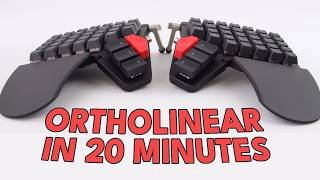
The whole thing is sitting on top of a ikea. So just a couple of notes. A couple of interesting points here. First of all, the keyboard, he has a, it’s called a chocofi, which I believe is a. It’s like a three column, three column ortholinear layout keyboard.
These keyboards are pretty awesome. I mean I use a, an awful linear layout keyboard here at home. It’s called Ergodox. And you know that has the same amount of. Okay, it has the same amount of rows as a regular keyboard does.
Right here I have the Dygma keyboard in front of me and this one has 1, 2, 3, 4, 5, 5 rows. And the Ogre docs which I use daily on my main computer, that has five rows as well. And yeah, so but it’s an awful linear layout keyboard. So all of the keys are essentially in lines straight up and down, if that makes sense with the Ergodox. It’s a great keyboard, but it does take some getting used to.
And what he has here is essentially like the next level up from that. It’s called the chocofi. There’s. There’s other keyboards similar to this, like the Khorne. I think the Khorne is the most popular one where they’re.
Yeah, they’re three rows. I think they’re like five or six columns across. So it’s like you have somewhere around like 36 keys, I think, on the Chocofi, very small. And essentially to use these, though, you have to move keys around onto layers. So it can get a little bit, like, you do have to do some tweaking and some.
Some learning, you know, relearning of where you think of keys being. You have to map things in smart ways. Using layers, using home row mods, which is where you take the modifier keys like control, option, command, and you place them on the home row, which is the HJKL ASDFG on the left side. Asdfg H A K L row. You set up the ability to do things like say if you tap on a key, then it acts as.
Acts as the regular key. So, for example, I could take the G key and I could have it. So if I tap on G, it just types out G, but if I hold down G, it can act as the command key or perhaps the control key. So, you know, you’re taking. You have less keys and you’re essentially trying to get as much as you can out of a few amount of keys.
The beauty of this is that you really don’t have to move your hands very much at all. The. The movement is very minimal. You’re not constantly stretching your fingers out, you know, out and around and doing finger gymnastics. Essentially, you’re just keeping your hands generally around the home row and just moving one row up, one row down in straight lines as well.
Because it’s awful linear layout. That’s what makes these awful linear split. I think they’re called Ergo. There’s a subreddit for them called ergometkeyboards. Yeah, that’s what makes these so popular, though, is just the fact that you just really don’t have to move your hands around, which for programmers, I believe is supposed to be very handy, even, you know, for writers.
But you do have to relearn everything you kind of know about typing. If you’re just used to regular keyboards, you know, like your Logitech keyboard, which is just one, you know, one box, you have to relearn all of that. And it will take you a couple of weeks to get probably back to somewhere around like 70 to 80% of your typical word per minute measure on your keyboard. So great keyboards. Very good for your fingers, very good at reducing rsi.
Also, you know, a lot of them are kind of like handmade. A lot of them. Some of them you have to, you know, you go to like a GitHub project and you download the PCB files and you send it off to somewhere like PCBway or JLCPCB, and they, they custom make the PCBs for you. And then you, you know, maybe a 3D printer case, you buy some keycaps. Sometimes you can even 3D print keycaps.
So the whole thing ends up being this like really, you know, kind of like not hobby project. But yeah, it kind of becomes like a. What’s the word? It’s like a craft, you know, your keyboard, it’s just. You build the thing yourself, so it feels like a.
It’s like a labor of love. So that’s why I think people love these keyboards so much. They’re kind of niche, but they’re also the people who are into the niche, like myself, really get into the niche. And yeah, it’s a deep rabbit hole. So if you’re, if you’ve got enough hobbies, you know, tread lightly with this one.
You might get sucked into it and end up spending hundreds of dollars and months of your life just building keyboards and testing out different keycaps and switches and, I don’t know, different ordering different PCBs from China. It’s gonna be fun. But it’s also, yeah, just, just be prepared. That’s all I’m trying to warn you about. Also, he’s using these, these clamps, which these use for photography.
You know, generally you’ll, you’ll use these to kind of like attach, I don’t know, like a light or, you know, sometimes like a microphone to objects that you have around the studio. Or if you’re filming out and about, you know, you might attach one of these to your camera or you just go clamp it somewhere so that you can, you can kind of like mount different items. And that’s why they have these 14 inch connectors on the end of them. That’s. These are the clamp things.
I’m talking about the, the crab looking items he has attached to the chair legs. And in order to use that with a keyboard, you do have to essentially figure out a way to attach a 1:4 screw mount to your keyboard. Some keyboards actually, you know, people are doing this more regularly. So some people keep some Keyboards actually have this built in. There are a few options for that.
If you’re interested in, you know, diving deeper into these kind of like weird mounting options, let me know in the comments. And yeah, maybe I’ll make a video on it. But yeah, it’s an interesting way to. To mount your keyboard. Just have it there on legs.
He has his keyboards both like sort of like almost like a 90 degree angle. So it’s like you’re typing. You’re kind of typing like this, which, you know, if you have the right sort of setup like he has here. It’s very simple setup. It’s pretty smart where essentially you have the keys kind of resting at this very like natural angle.
So it almost feels like your hands are just, you know, like kind of just resting by your side. Not up here obviously, but, you know, down here by your waist and you’re kind of typing. So you know, your hands are in a natural handshake position and you’re just typing right there. It’s very, it’s very. I’ve tried tenting like this.
You do. Again, you have to get used to it because it’s such an extreme angle and you can’t see what you’re typing. So essentially you have to be a touch typist and a pretty good one in order for it to work. But it’s super comfortable if you can find a setup that works for you. And getting it to work for you can take a lot of tweaking and a lot of experimentation.
But yeah, that’s my notes on the keyboard. So let’s get back to the video. The whole thing is sitting on top of a IKEA stool. This thing is like 35 bucks. You can literally buy it anywhere there’s an Ikea.
And it’s perfect for my needs. It sets everything in an amazing position for me to, to work. And I love it. You’ll notice I have the MX Ergo mouse. I love this thing.
It just. Honestly, if you’ve never used a trackball before ever in your life, highly recommend it. Give it a go. And you’ll never probably go back to a regular mouse unless you’re a gamer. And that’s okay.
This. Right. Just a note on this mouse. I actually have a version of this mouse. I have the Logitech Ergo.
I think it’s called M575. I mentioned it in my previous video on my Digital Nomad Setup, work setup. And it’s a great mouse. I’ve never used a thumb trackball before, but this is. Yeah, these are both thumbtrackballs.
I added a 3D print to mine because it doesn’t come with this stand that you see the, the Ergo has. I think it’s called MX Ergo. This has like a small stand which can kind of flick out and it raises the mouse up. So again, your, your hand is, is kind of like in a handshake position when you’re using it and your thumb just kind of rests on the top. Super comfortable.
Great mice. Very. I’ve heard a lot of people say they don’t like thumb track balls because it can kind of hurt, you know, because you’re using your thumb constantly to sort of move the ball around at the top. For a lot of people, that can actually cause a lot of pain in their thumbs and that’s, that’s why they don’t like them. But I don’t know, I feel like I use mine just in my travel setup at home.
I have different trackballs which I use, which are just normal index finger track balls. And so I don’t use my thumb that often. I don’t feel like, you know, maybe if, if you game a lot, you know, you might notice a lot of fun pain. So therefore maybe these sort of thumb trackball mice might not be for you in that case. But if you’re, if you, you know, if you’re just a regular computer user, I think switching to a thumb trackball, I’m surprised at how comfortable they are.
And also great, like as a portable option, just because they’re quite small, the ball doesn’t fall out. As weird as that sounds with other trackballs. Some the ball was just kind of like resting in there. So when you move it around or chuck it in your backpack, you know, you might pull the mouse out of your backpack and it’s just missing the ball. So these mice are great because the ball kind of stays in there.
You can push it out of a little bit of force just to clean it. You’re going to need to clean it once a month or so. But yeah, great mice highly recommend it. This right here is my audio interface. I’m going to get it to focus here.
The Audient ID4 Mark II, I believe it’s called. And this is what my mic, which is a shirt SM7B plugs into, as well as my headphones, which are the Moondrop Katos. I did a unboxing of those a few years back and they are the most amazing, pretty budget level headphones. But they’re, they’re awesome. Everything is plugged into my computer via USB C up here and is sitting on a Ulanzi MT28 carbon tripod.
And this thing is used so much in my life. Like I, I use this for steadying my phone, I use this as a tripod for cameras. And obviously right here I use it to, to hold up my, my microphone. If you can see over here I have a Anker 120 watt. That’s actually 100 watt charger but that’s what I plug this into and it just runs everything without any issue whatsoever.
Let’s talk about why I’m sitting on the floor. Floor.
Before he gets into the stuff about the, the floor sitting which you know, I think is, I don’t know for me personally I was like a next level step. I just want a couple of notes actually, which I’m just noticing now. I didn’t notice this the first time I did notice it, but I didn’t really pay attention the first time I watched this video is. So this setup seems to be more sort of like optimized for someone who’s. It’s like a travel setup, but it’s someone.
If you’re doing like overland travel, you know, if you’re just doing a long road trip or you know, maybe doing a work trip and you’re going to be staying in hotels mostly, you know, somewhere where you can kind of like take your stuff with you maybe, you know, maybe just go to local Ikea if you can find one. You know, you buy the stool while you’re there and you buy the stall just for the length of your trip. But yeah, this seems like a, you know, it’s like the items themselves which I took Magec stand and the keyboard and the clamps, those all seem quite portable. You’re going to throw them in your backpack. But you know, the, the audience audio interface and the, the microphone on the tripod stand, which is a very smart idea by the way, I might steal that and do need another microphone stand.
Yeah, those things, those seem to be more like, you know, you’re trying to take your, your home setup on the road with you. So I could see it being very useful for that. But yeah, there’s something to keep in mind. You know, maybe just take components of this setup and you know, utilize it in your own setup. If you’re looking for something more portable or you know, if you are going to be sort of staying in places for, you know, longer, longer times and you need a more permanent setup.
You could steal, you know, the stall idea and use the clamps and even have like whole audio interface. You know, you could even bring second screens into a setup like this. It’s got quite a lot of space, but it’s large. You know, you’re not taking this on the plane, not all the other parts of it. So, yeah, just.
Just something that I noted. Sitting on the floor.
Let’s talk about why I’m sitting on the floor.
So inevitably, people are going to ask, why are you sitting on the floor? Don’t you have like a Herman Miller $300,000 share? And I did at one point. And the only thing is that for me, it just didn’t work. I still felt like garbage every single day after getting back from work.
And I found better results by sitting on the floor by really focusing on my posture opening up. And as somebody commented in one of my videos, I needed more splay in my life with my keyboard. Well, you got it. The thing about sitting on the floor is you can’t sit in one position for very long. You have to continually move.
So I’ll just open up my legs or sit with them open like this while I’m typing, or I’ll grab my foam roller and sit upright on it while I’m working, like this, or with my legs crossed or whatever, and I’m continually moving. The benefit that I’ve seen thus far in movement is completely outweighing the standing desk as well as the ergonomic chair. And that’s saying something. So if you have back problems, if you have issues with your shoulders feeling tight and everything like that, try sitting on the floor. It’s something that I’ve been experimenting with since we got here.
And I think I’m going to continue with it well into the future. But, yeah, that is all right. I think that’s. That’s most of the video that’s pretty interesting. I don’t know about the floor setting, man.
I’m getting flashbacks to, you know, being in. In primary school. I know we call it the rest of the world elementary school. Yeah. Where you had to sit on the floor while, you know, read books or, you know, teachers talking to you.
And yeah, I was always just constantly, you know, you’re supposed to sit cross legged. And even as a little kid, I was constantly, like, moving from one side to the other, just trying to, like, you know, keep my legs, keep my legs awake, I guess. I just, I don’t know. I think the genetic bad knees or bad legs or something like that, I can never be comfortable. It’s made me very fidgety.
And I know it always Affected my concentration. I think for some people, though, that might be a good thing. You know, if you’re. If you’re generally someone who, you know, you don’t. You don’t get distracted by having to move, move around, you know, like, you’re just kind of like, pain.
Got a little bit of pain on my left thigh. Let me. Let me shift my weight over here and move a leg out over here. If you’re someone who’s. Who’s okay with that and it doesn’t kind of disrupt your workflow, could be great.
It could just be a way to kind of force you to stay active, sort of stay mobile. You know, you’re working in positions where how many times you sit on the floor. We just don’t do it anymore as adults. So I think it would be kind of interesting to, you know, work different parts of your body in that way. I’m sure you’d have to work on, you know, a lot of core strength just in order to stop you from slouching over consistently.
And also just from the movement. I think that would actually, you know, it probably would actually just work. You know, your obliques, your sides work. Different parts of your thighs basically make your legs more active, which we don’t really do when we’re sitting in chairs. Your legs just kind of stay in one position.
They’re supposed to stay in, you know, feet flat and proper ergonomic position. So kind of interesting sitting on the floor. I’m not going to try it, but if you do, if this is something, if you’re all about the sitting on the floor life, let me know. It’s kind of interesting. I’d love to hear more about how, why, and.
Yeah, maybe I should experiment. Maybe I should do set up a little floor setup. Maybe I’ll film it. Be interesting video. All right, Perfect.
Related Links
As an Amazon Associate I earn from qualifying purchases.