Inside 3 Insane Video Editing Setups Online | Pro Setups Compared
We react to three pro video editing setups, from a film colorist to a fully automated solo studio, focusing on speed and workflow.
Key Takeaways
- Even in creative fields like color grading, speed and efficiency are crucial for meeting deadlines and allowing more creative iterations.
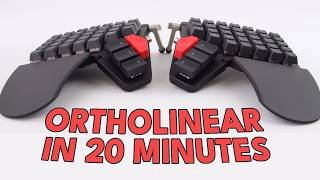
- Nat Jinks, a film colorist, uses a compact DaVinci Resolve Mini panel and a half Moonlander keyboard as a macropad to keep one hand stationary and focused.
- This minimalist approach prioritizes focus and ergonomics, reducing physical strain and mental distraction from hunting for specific keys on large control surfaces.
- The concept of 'progressive overload' in color grading means getting more passes (reps) on a project in a shorter time generally leads to higher quality output.
- A Riverside studio showcases smart-home automation for video production, closing blinds and killing lights with a single command.
- Jeremy Siers' studio features modified Husky workbenches, a rising TV, a walking pad, and ultrawide monitors for a diverse workspace.
Need to Complete High-Quality Creative Work Fast?
We're obsessed with making tools that help you FLY THROUGH your creative work! If you want to produce more quality creative work then you ever have before, then drop your email below and get exclusive first access to new products we launch, at HUGE discounts, all dedicated to helping you Complete Creative Work Faster
Full Transcript
It’s another episode of the Setup Reacts show. And today we’re looking at video editing setups.
We’re developing a product at InputZen called the BuildBox. It’s a video editing Macropad that will help you crank out high quality video edits faster than you ever have before. And since we’re in the Video Editing Tools game, we, we think it makes a lot of sense to take a peek into the video editing setups and studios of some of the most prolific video editors online. If you want to dive deeper into all the setups that we cover here, or submit your own setup to be featured on the show, visit the Setup Reacts website linked in the description. All right, let’s get into this.
Bring on the video editing setups. This first setup is an interesting one. This is a setup from Nat Jinks, who is a colorist or film colorist. And so the video is made by this company called zsa. They’re pretty well known for the keyboards that they make.
They make the Voyager keyboard, the Moonlander, the Ergodox, which I actually own sitting on my desk over there. Yeah, the Voyager is the most recent keyboard, is a beautiful looking keyboard, pretty pricey, but I think just based on, you know, the hardware that they use and the software, actually the configuration software on ZSA stuff is excellent. It’s really good. I’d say best in class for, you know, mechanical sort of custom keyboards. So the company behind these keyboards are called zsa.
And they made this video series called Spaces where they just went around. I think they did like a road trip around the US Just went and spoke to a bunch of customers, a bunch of people who use their keyboards and saw how they use the keyboards in their daily life. So they have writers on there. I think they have like a lawyer. There’s one, there’s one setup which is like a lawyer setup, how he works.
And this one is a film colorist named Nat Jinx. So we’re going to watch the video and I’m going to react to it.
So all through this space is different offices. Some are production offices, some post production. A lot of filmmakers, people in different creative industries and people are kind of nestled in their own world around here.
My name is Nat Jenks. I’m a colorist for films and episodic TV shows. This is a space that some friends and I set up. It’s in an old school building that’s been renovated and restored. The filmmakers that I’m working with are under extremely tight deadlines.
So anything that I can do to speed up the amount of time that it takes for me to get to the finish line for a project, it’s not only about finishing the project quicker, but actually allowing us to have more time to interact iterate. Right. That’s an interesting note he made there. Kind of about speed, you know, and sort of like, how did he phrase it or something? Like anything.
Anything he can do to speed up getting to the finish line. You know, it’s very important. I find it interesting that, you know, professionals who work in these fields in like in the video editing field. Sure. They need to, you know, he’s a colorist, so need to do, you know, the highest quality work.
They need to make sure that they’re essentially creating a good looking picture. I guess a good feeling picture. I guess that’s how it works with color as well. Like it’s kind of like a feelings based sort of art. You know, you’re sort of trying to make sure the tones and everything looks just right for the movie.
And I guess you can sort of adjust colors to sort of bring out certain qualities of a scene. And so yeah, it’s interesting that, you know, he’s essentially like an artist, but speed really matters there. You know, it’s like you have to, you have to produce things to a deadline. You probably have to do a lot. And so you can’t really just be sort of endlessly sitting there looking at your work kind of going, oh, you know, that’s a beautiful scene.
Let me just watch this 15 times over and just admire it. It’s just kind of like, no, I need to, I need to get to a high quality, probably as a high quality bar and do it quick and then move on to the next scene and do that quickly too. So it’s both quality and speed. I find that that’s an interesting balance there because it’s on the one hand very technical, but on the other hand, ultimately it is a creative art form. Right.
And the way that we absorb it is not by sitting and looking at like, you know, individual pixels or colors, but is by watching a film and absorbing it. So there’s sort of a give and take between those things. And for me, the number of iterations that I can get in to do a pass on a film, watch it, see how it feels. The more quickly that I can work, the more, more iterations I can get in. That’s interesting.
Right, so it sounds like it’s like a reps. It’s a reps based problem. It’s kind of like when you go to the gym and you know, you’re trying to build your muscles up or just trying to get in shape. Whatever your goal is at the gym, a lot of the times it’s just about just doing the reps. You know, you just need to continuously. When I go to the gym, occasionally, there’s something.
There’s a concept called progressive overload, which is this idea that you’re continuously just sort of moving up slightly in weight, and that’s how you can kind of increase your strength, strength being the core concept there. And also, you know, increase your, like, muscle size or whatever your goal is. Maybe flexibility, or if you’re an athlete, perhaps it’s increase your speed or jumping height. You know, if you’re a basketball player or volleyball player or something like that, you use this concept of progressive overload. So it’s, you know, even if it’s just.
We might be talking like a few pounds or kilos, depending where you are in the world, you know, you might just be adding 2.5 kilos every time, every. Every gym session. But that small little overload, it kind of adds up. And before you know it, first of all, before you know it, you’re lifting some seriously heavy weight. And also, you’re getting just a little bit stronger every time you do the workout.
You’re not just lifting the same weight. That’s not really how gym works. And it sounds like, you know, with the video colorist profession, you’re essentially trying to do the same thing. You’re just trying to get in as many reps as possible. Obviously, he’s not training in that way.
He’s more. Trying to get more passes of the job. And the more passes you can do in the shorter amount of time, the generally, the better the quality of the output is going to be. This have a design principle where they’re a huge control surface with a dedicated button for every function that you would want. What I’ve found is that actually the exact opposite is very useful, which is that I mostly want to have one hand on either pen or mouse and then another hand on a set of keys and basically keep that hand stationary.
And that by using a very large number of modifiers and shortcuts, I can map almost everything that I need to a single hand, which means that rather than stopping what I’m doing to move my hands over a very wide surface, I can just keep my eyes on the screen in front of me, keep one hand on a mouse or pen and the other hand on a Macropad.
I. I looked into these, these color editing panels. If you See the, the panel he has there on the screen with the sort of trackball, the big, the wheels, the three wheels, I looked into those. This specific One is a DaVinci Resolve by Blackmagic panel. It’s called the, the DaVinci Resolve mini panel. There’s larger ones, this is the medium sized one.
And essentially you can, you know, the large panels has a very specific button for each specific function. And it seems that he doesn’t like that. He likes a smaller panel and having his hand sort of on one in one place. He doesn’t like to move continuously between devices. So maybe it’s like one hand continuously on, on the, on the macropad, the keyboard there set up as a Macropad and then he can use layers.
But it’s like you keep your hand in that position and use your other hand for, you know, controlling other things. You can move from the mouse to the small panel. And it seems like he lacks like sort of like a centralized, almost like a minimalist colorist setup essentially. Which is, which is an interesting concept. I like that.
It seems ergonomic. You know, it probably reduces like body pain from just continuously reaching over the massive panels in order to get, keep hitting the same buttons over and over again. Instead you kind of like have everything in one place. But I think the real reason seems to be more for like the focus element. You know, he’s trying to sort of say like locked in on the task and he doesn’t want to distract himself by continuously like hunting, hunting for this, this one key which is, you know, key number 422, which you’re pressing up in the right hand corner.
Instead it’s just like, you know where it is kind of like by feeling and you can kind of just keep your hand in that one place and just, just feel the button. So I like that it’s essentially trying to create like a smoother connection between four. Like, oh, I want to apply this and your body, your body movement. So to press the button, you know, you’re reducing that down by just keeping it on one pad, which is always in the same place. I like that it’s smart.
And I guess the more you use it, this the kind of, you know, muscle memory, it’s going to remember it without even having to think about it, which is a smart move. This is why I love Macropads, which is why I’m building one in that way because you, you see these giant control surfaces which are, they are useful, but they also, there’s an element of them which is a little bit theatrical. And that like people walk into a room and they’re being charged, you know, $500 an hour and they see this giant piece of equipment that like, oh, this must be a big deal. You know, in reality, I think, as is so often the case, less is more. Really the key just to stay in a flow state where you’re not just.
Quick note that panel there that you see on the screen. This, this colorist panel with the free wheels on it. I looked that up and yeah, like I said, it’s called the DaVinci Resolve mini panel. There’s also like a micro. Was it called the micro color panel?
And also an advanced panel, which is huge. But this one, this panel he has here costs $2,319 if you buy it from Blackmagic themselves. And the website described it as a portable DaVinci color panel with three high resolution trackballs. See trackballs here, 12 primary corrector knobs and LCDs with, with menus and buttons for switching tools, adding color nodes, HDR and secondary grading. Wow.
It sounds like a very advanced panel. But yeah, that’s, that’s two grand just for that panel alone. And the larger one is like 20 grand. So yeah, these things are very expensive, but they’re very, they’re like highly specific tools. And I guess for professionals it makes sense.
You know, like I said, you might be charging $500 an hour, you know, for coloring and this might be for like high, high profile movies. You know, it might be the movies that we’re seeing on the big screen. So kind of makes sense that it would cost quite a bit to make sure the color correction is essentially perfect for it. But yeah, man, I saw that price. I was like, oh yeah, I got to share this with the, with the setup reacts crew, like, oh, this must be a big deal.
You know, in reality, I think, as is so often the case, less is more. Really the key is to stay in a flow state where you’re not stopping to look down at your hands or stop to worry about like anything technical, but you can just move quickly. And so for me, having like everything mapped to essentially one hand, I do cheat a little bit and have another hand over here, just forget to measure. I find that that’s actually incredibly useful.
I’m not sure what switches he had there on that Moonlander, but they sounded like not tactile. But the other, what’s called linear sounds like linear switches. I’m not a fan where, you know, you have like a sort of bottoms out so it doesn’t have Like a tactile normally has like a bump, like a slight bump. So you can feel on, on the bottom which kind of gives a haptic feel to each key press, which I prefer. But then there’s also like linear switches where you just press and it sort of hits the bottom and comes back up.
Obviously there’s different types of linear switches, but generally speaking, whenever you hear that kind of focky, kind of, what’s it called, FOK T H O C Not swearing. Whenever you hear that sort of like echoey, slightly echoey sound that’s generally a linear key. And also just want to touch on what he was saying about flow states. You know, that’s why he likes having sort of using a single hand on his essentially like Moonlander Macropad. And yeah, I actually looked into this a little bit in terms of like flow states and what happens when you eliminate switching, switching between devices, switching between tasks.
And there’s actually interesting concept from, is an author, I think he’s like a university professor called Cal Newport. He wrote a book called Deep Work, how to be a Straight A Student. So he’s done a bunch of work around sort of like lots of research into focus, focus and sort of like high performance through intense focus and what he calls deep work. And he has actually has a quote which I thought was really interesting in his article called, the article is called Our brains are not multi threaded. And in that article he states that the human brain is not a multi threaded computer processor.
That kind of means like we’re not very good at as humans at switching between tasks and we’re kind of wired for like single threaded, non switchy sort of activity. Fundamentally we’re not good multitaskers, but we are quite good at sort of locking in on a single task. Just sort of like just working, working through it. You know, we can, we can as humans we can grind tasks down pretty well. You might notice this if you’re doing something like if you’re fixing a bicycle, you know, if you’re putting the chain back on a bicycle, you know, these sort of tasks which they don’t take a massively long time, but it might take like 10 minutes of just sort of repetitive, repetitively doing the same thing.
And you know, if you can kind of get into the groove of it, you know, you kind of find yourself in this weird like element. It’s very calming, it can be very relaxing. But yeah, there’s something very calming about this like single task doing the same thing. And you’re just kind of cranking out the Work at a steady pace. And where I think as humans were kind of like optimized towards that.
We’re not very good at like handling 5, 6, 7 different tasks at the same time and just kind of like doing a little bit of one, a little bit of the other. Even people who say that they’re, they’re good multitaskers find that what they might be doing is more sort of like 10 minutes of one task, maybe there’s a little break there, maybe not 10, then it’s 10 minutes of another, it’s not 30 seconds of one, 20 seconds of another, then back to 30 seconds and then 20 seconds of another task. It’s more like there’s generally a slightly longer period there. So we are as humans quite good at this. This is sort of like single threaded tasks, as Cal Newport stated.
And I think that sort of ties into like flow states, you know, if you’re ever trying to reach, if you’re ever trying to reach a mode of work where, you know, you’re sort of locked in, you feel kind of like at one with the work that you’re doing. I think sort of taking this concept seriously, this multi threaded versus single threaded, taking that seriously, thinking about how you actually operate and trying to remember, you know, the last time you’re sort of locked in on a task, maybe think about what that task was. And I think you might find that it may have been something which was actually quite singular, you know, singular in focus. And I think we can sort of utilize that as like an interesting, it’s like an interesting note about human behavior that I think we could sort of use in a powerful way. And it seems that he’s kind of trying to do that with his tools here.
I’m not sure if this is just, you know, something which he just happened across and it just works for him or if there’s something he’s actually thought about, he’s actually researched. He may not be a nerd like I am. So a co worker of mine was using Macropads and I was really curious about them. He was using the X keys which have been around in post production for, I don’t know, decades maybe. I quickly kind of grew frustrated with those.
Both the form factor and the interface for programming them was really important to. He just mentioned the X keys Macropad and I’ve actually, I looked into these a while back and they’re kind of like the og, the OG Macropads. A lot of them. They kind of look like if you, you know, if you go into a store, like a Grocery store.
A lot of times they’ll have these sort of pads on the, on the cashier, on the cashier counter. You know, they’ll have like a sort of keyboard which is generally just has numbers on it. So I mean maybe they don’t have this anymore because everything’s sort of, you know, cardless. But they used to, back in my day, I’m aging myself a little bit here, but they used to have these small little pads where you could just tap in a bunch of numbers, sort of say how much each item costs and it could automatically tally everything up. That’s kind of what X keys.
They made products which I guess sort of looked like those functions similar to those, but they actually have a bunch of different products. They have these Macropads which are, I think they have like a 16 key one. No, it’s 24 keys, a 60 key and 80 key Macropad. So the 80 key one is like, it’s huge. It’s like a, like the size of a small screen or maybe like a, a 13 inch screen on your laptop.
It’s kind of like the size of that and it’s just keys and you can kind of change the legends, you can change the, the top, the tops of the keys and place in, you know, new characters. So they’re actually quite, they’re kind of like manually customizable in that way. The software on them is universally, universally said to be terrible. I think it’s just because, you know, they’ve been running for so long and a lot of their software was made maybe, you know, when we’re talking in the early 2000s, you know, these guys have been around for a long time. But yeah, the x keys, macropads, OGs, it was those.
Both the form factor and the interface for programming them was really important to me that I find a solution where the customization was actually loaded into the hardware. Because I work in all sorts of environments that are not my own and, and because of the security and the environments that I work in, it’s very challenging to get anything authorized to install additional pieces of software. It’s always required that the systems are air gapped. So meaning they have no connection to the Internet at all. So having all the different shortcuts and macros programmed into the actual piece of hardware so I could take it with me, go to a facility, plug it in and have it work out of the box was key.
The multiple color platforms that I use have vastly different keyboard shortcuts. But I can consolidate a lot of the core functions so that they have the same shortcuts, which is super useful.
I was talking about this earlier today. To me, it’s very important to not have heavyweight companion software along with any of my devices. I’ve used a few which do have companion software and they’re good when they kind of stay out of the way. You know, if, like, you don’t really have to think about it or if it’s a product which, you know, I’m just not moving around. But I switch between different computers.
I had a. I used to have a Linux computer as my. As my daily computer, my daily laptop, essentially. At the same time I also had a. I think I had a Windows PC, which I used to just keep running for just some small tasks. Now, however, I have literally two Mac computers in this room as well as I’ve got servers of sitting in the corner. So, you know, you need to switch between different devices.
And I don’t want to. If I want to move my devices between different computers, I don’t want to have to set up companion software on each application. So for me, it’s just like a convenience thing. I like things to be mobile, so I like everything to be stored on device. You know, if I make a bunch of customizations, which I nearly always do, to like a keyboard or to a Macropad, I want those same customizations to work if I move to a different device.
I think he’s talking about it more from maybe like a security standpoint. A lot of times, you know, if you’re bringing in your device to work on company computers, they just can’t have you installing software. It’s just too risky. So it’s like you can’t install anything. Sure, maybe you can bring in your own keyboard, but the keyboard has to work, you know, just as a basic USB device.
So it has to just be recognized as a keyboard. And it sounds like that’s what he needs. And the ZSA products, they all, as far as I know, they can all do exactly that. They can all store all the functions on the actual device, which is very good. In my opinion.
Maker’s time is an incredibly valuable resource. Often they’re split between multiple tasks. They’re working on color, they’re working on sound. So anything that can get you there quicker is really a big deal.
You know, I work on an incredibly wide range of projects, which is really lucky. Today I’m doing some tests with the photographer Nan golden, who’s a hero of mine. And I did a documentary film called all the Beauty and the Bloodshed that Laura Poitras shot it won the. The Venice Film Festival last year. And it’s an incredible film to get to work on that type of range of projects where I’m one day, you know, working with a legendary photographer like Nan and then on another day working on a Star wars project.
Sort of from the. The most big sort of otherworldly thing to the most like real and intimate type projects. It’s one of the things that I’m most grateful about with this job is the variety of different projects that I get to work on. That’s so cool. It’s so cool to see someone who seems to sort of work on high profile movies.
So high profile film productions. It’s so cool to sort of see their very sort of personalized setup. Also I find it amazing. Like hisp. He seems to.
I think that’s a projector screen there in the back and it seems to be. I’ve seen other colorist setups on YoYouTube. I’ve seen other videos of other people’s video coloring setups. And lighting seems to be like a massive part of it, obviously, because if you have external lighting, it can affect the colors that you’re seeing on the screen. So if you get the coloring wrong, you could be making edits which just aren’t accurate essentially, you know.
So it’s really important that you see what’s true when you’re actually making these color edits. And so that’s why I think he has this projector screen here. But at the same time it seems really dim. You know, it seems really like there’s a nice sort of mood, like a dark sort of almost like a cinema sort of effect there in the background versus up front where you can see it’s more light. And I’m sure when he’s actually operating, everything is almost like, I won’t say pitch black, but it’s very dark.
And they seem to use a lot of like ambient and bias lighting. Bias lighting I think is when, you know, if you have lighting on the back of your screen and it’s like reflecting against the wall. I think they use a lot of that in order to just add, you know, maybe the effect of light bleed that you might see when you’re watching your, you know, your TV in your living room. You might have the main lights off, but sure, you know, you might have the light in another room on. So I think they’re trying to, you know, keep that sort of reality of how movies and screen productions are watched in order to, you know, get the best colors for what they do.
I’m just fascinated by this whole industry, this sort of video colorist industry, I guess, because I love movies and yeah, this was a fantastic setup. Let’s move on to the next one. I’m about to record a podcast, so come with me to get ready in my studio. I’ll show you my gear, the entire process, all the way up to hitting record. So.
So here’s my studio. It’s a little 8 foot by 9 foot room here in the house, but everything is decked out and ready to record. Haven’t turned anything on because we’re going to do it together now. First thing I do. So this setup’s interesting.
This setup’s the, I guess home studio, home office of who I think, I think, I haven’t confirmed this. I think he’s the head or maybe the founder of Riverside, which is a video podcasting production platform, I guess is the best way to put it. They have a bunch of different tools in there. They have very good audio recording tools, they have very good video recording tools. They sponsor a lot of videos.
You probably might have seen them around. If you’re, you know, if you’re interested in video production and you’ve been looking at a bunch of YoYouTube videos about video production, you may have seen a Riverside sponsored video. But yeah, this setup seems very sort of optimized for. This setup seems really optimized for producing like well shot short form and maybe like, you know, medium to long form content in a very small space. I think he’s done a very good job of utilizing this, what is essentially, you know, seems like maybe a small room, a small spare room which I’ve converted into his office.
Sort of converted this into this really good space for sort of shooting and I guess producing video. Because the living room is here and the kids might be here. While I’m recording, I’m going to close that door and then also put this sound blanket that I have on a swivel arm, close that and that helps dampen the noise from the outside and cuts down the echo. In here you see some of my background decor. These are GIC sound acoustic panels.
You can get different designs and colors, which is pretty sweet. And that’s some of my background decor, which got a little jazz Lego set there too. But this is where all the magic happens. So let’s sit down and get ready. First thing, take lens cap off.
This is the Sony A7IV. It’s what I use to record all my videos and podcasts. And the multi view for that ATEM Mini Pro goes into this monitor. So I’ll turn that on and here I can preview the camera shots. And I also have this.
That’s nice. I think that camera, the A7IV, I think that’s a. It’s a 4K full frame camera. That might not mean anything to some people, but yeah, if you’re into cameras, that’s, that’s a very high quality camera. Full frame just means that the sensor in it essentially can.
It doesn’t crop the picture. When you’re recording or taking photos, you get the full frame, you get the whole thing. Other types of cameras like the one I’m using is a APS C which essentially apply like a small amount of crop to your shot. So essentially this matters when it comes to your picking lenses, you know. So with a full frame camera you put a lens on it and you get the full range.
Whereas with a APS C camera there may be some cropping, so it may mean you need to pick your lenses differently. Also these generally tend to be very high quality output in them. Sony make brilliant cameras. But yeah, the camera he has there, the A7IV is beautiful. And I’d love to have one external display for my Mac.
Now as you can see in this shot that the edge of the monitor is. So I’ll turn that on and here I can preview cast and the multi view for that ATEM Mini Pro goes into this monitor. So I’ll turn that on and here I can preview the camera shots. And I also have this as an external display for my Mac. Now as you can see in this shot that the edge of the monitor is actually in the camera shot.
But my studio display here is actually on a VESA mount arm so I can actually push this back using one hand. So it’s a little weird right now, but I’ll push it back out of the camera shot and now I’m ready to go. Now next up for gear, I actually have an Elgato low profile mic arm that holds my podcasting mic. I’ll bring that over and I’m going to go with the camera and mic setup. Also this mic is going into that Rodecaster Pro 2 and that’s connected to my Mac studio.
And I forgot to mention, this is the Earthworks Ethos microphone. As you can see, I have several microphones that I could be using, but this one’s still my favorite. Sounds good for my voice. Doesn’t pick up a lot of room noise or echo, so it’s my preferred. So the first thing I open on my Mac, that’s A pretty sweet audio setup he has there.
It’s kind of like. I wouldn’t say it’s top of the range, but it’s up there. You know that, that Earthworks E Force mic, that’s the, that’s, that’s a beautiful. The Earthworks make beautiful microphones. They.
They look fantastic. That’s. That’s all I know about them. I’m not sure about sound quality, obviously. I’m pretty sure they all sound amazing.
But it seemed that he also had a. Was it a Shure SM7B microphone as well as the Rode PodMic, which is what I’m using here. And they all seem to be going into the Rodecaster 2, which is kind of like an audio interface with a bunch of features. It has different profiles. You can store profiles on it for your different microphones and sort of applies a bunch of different effects depending on which microphone you have attached to it.
A lot of podcasts use those. They are really nice. I wouldn’t even really call them pricey. They’re just, you know, premium priced. And I think that’s because of how many functions they sort of squeeze into those Rodecaster devices.
I want to get one. If you can’t tell, I’ll be looking them up. But that is a beautiful audio setup he has there also. I love that he has the. I think he said he has a ATEM Mini Pro, which is a video switcher.
Those are really handy to have. It’s sort of like, it allows you to connect to take the HDMI output of cameras and you can sometimes, you know, up between like four and sometimes up to like eight, maybe 10 different cameras, you can fit, feed those into the ATEM Mini Pro and then you can switch between them. So when you see like a podcast being a video podcast being shot in a studio and they’re switching between different cameras, a lot of times they’ll use a device like the ATEM Mini Pro in order to do that. And you do it essentially in hardware. You’re not using software.
So they’re not necessarily connected up to like OBS or eCamm, you know, sitting on your Mac or on your computer, on your Windows computer and switching between those different angles. In software, the ATEM Mini Pro does it for you in the device. And I think it can record, it can, it can record the output of multiple cameras onto a lot of times onto a hard drive, sometimes onto the device itself. So they’re very handy and allow you to just do a lot of things without essentially bogging down your computer with 4K video feeds from multiple different cameras. You know, lovely devices because we plan every episode in Notion.
I use that to collaborate with my co host. I’ll open that Notion document and the next episode notes. Here in Notion, we keep all the notes, everything we’re going to talk about, links to different articles, and this is going to be open the entire time I record. You actually see it open here as I was recording Primary technology. That’s my tech podcast.
Then in addition to Notion, of course, I’m going to be opening Riverside because that’s what I use to record. Now that I’m signed in, I’m ready to jump into the studio. But we have to set the scene. And for that I actually have a lot of lights here in my smart home. See, this is Apple HomeKit and I have a lot of devices here in the studio.
Specifically, I actually have different colors for different scenes. So I’m going to run this video blue scene point, you guys this way so you can see. But as soon as I start running that scene, you’ll see some of the lights turned off. That was the ceiling fan light above, but the colored lights behind me, those turned on. Those are Philips hue lights.
I’ll go through those in a second and you’ll see the blackout shade is starting to close. You’ll also see here in the shot, as that blackout shade closes, the lighting gets better and better. You see more of the color on the background. That’s because it’s going to cut out all of that natural light coming in through the window. And now I have complete control over my lighting.
Some other lights that that HomeKit scene enabled was my key light. This is the Amaran 200X with a light dome 2. I have a whole video on lighting. I’ll link that above if you want to see my setup. And then I have a couple Elgato key light airs.
There’s one there as a fill light and one up there for a hair light. And as you can see, my background is now blue. That’s an EVE flare, that glowing orb. I have a gradient light strip back there. And what’s really producing a lot of the color is this hue sign.
Floor lamp. It’s a pretty tall floor lamp. Again, Philips hue. You do need a hub, but it works with every smart home platform. And that does a lot of the work of coloring the background.
And like you can see it doesn’t look very saturated in color when you’re just looking directly at it. But because my aperture is really wide open on my camera lens, which is a Sigma 35 millimeter F1. 4. It’s letting a lot of light in. I keep my key light very dim and now you really get that nice look behind me with the saturated color.
You can see other videos here on the riverside channel, which subscribe and hit that like button and you’ll see what that background looks like in different colors. Blue, purple, just plain. And I can change it at a moment’s notice. Now the next thing I do on my computer is I share a lot of screen. That’s pretty sweet automation setup he has there.
I love that you can just. Was it in HomeKit, Apple HomeKit. So I guess you can just do it from the phone. Maybe you could just use Siri, you know, speaker command or perhaps press a button on a panel and it sort of turns on the lights that you need, closes the blinds automatically. That seems like a very good sort of a sit down, press a button, start recording kind of setup.
Very highly optimized for sort of content production there. Now for my headphones, you can get a nice pair of Shure in ear monitors for about 100 bucks. These are Beyerdynamic Silentos. They’re really fancy. They were sent to me.
I wouldn’t recommend just for doing podcast recordings, but they do sound really nice. And these are going to plug into the headphone cable that I have here. This is an extension going all the way back to that Rodecaster Pro 2, way back there. So that’s why I have an extension. My headphones are plugged in.
So I’ll put these in my ear and I’m ready to go then. So those are in ear monitors that he’s talking about. I actually have a pair. I’m using a pair of Shure SE215 in ear monitors at the moment. I bought these years ago and they’ve sort of.
I sort of bought these before. There’s. There’s like a new wave of these kind of like Chinese audio companies who make these, you know, some of them really good in their monitors now for it can be very cheap. You know, we might be talking like as cheap as like $10 for a decent little pair. A lot of them, you can customize them.
They sort of use these, what’s called like MMCX connectors to connect to the cable. So you can, you know, sort of change the cables in them. A lot of them you can even get these like Bluetooth receivers which you then plug into the. The tips essentially which go into here. So you plug in these Bluetooth receivers and the wire sort of flows to them.
So you can make your in ear monitors which were wired before like my ones and essentially make them Bluetooth so you can take them with you. Yeah, you can. There’s this new sort of new wave of. It’s called Chi fi, Chinese hi fi where yeah, people essentially like specializing now and looking into all the different options of these cheaper but still pretty high quality in ear monitors. If you’re looking for good quality audio, it’s an interesting path to go down.
I also think for video production, a lot of times you actually need. You need headphones. Simply because if I’m recording a video, if I’m reacting to a video especially I might be playing sounds and if I play them through speakers, then my microphone might actually pick up that sound which kind of creates like a loop, like an audio loop. And so that’s kind of like it just. It can just completely destroy the quality of a video.
It’s impossible to listen to it. So you need inner monitors a lot of the time just to be able to hear it in a monitors sort of stay out of the way. And yeah, just, you know, a lot of times you’ve got hair like me, you can’t even see them. So yeah, they can. They can work quite well.
So I think the rest of the video is sort of like a deep dive into how he’s using. Riverside is his tool. This is on the Riverside YoYouTube channel. So obviously, you know, we’re sort of more interested in the setups here. So I think we’ll call that the end of this video.
I think it’s a great setup. Like I mentioned before, it’s a great setup for video recording. I love the automation. I love his camera setup. I love his audio setup.
Especially Matt, his microphones, man, there’s a beautiful set of microphones he has. It’s just kind of like he went through my Mount Rushmore of. Of of microphones there. And I love the lighting. He’s.
This is a very good lighting setup for. There’s nothing crazy in there. There’s nothing which is maybe above, I’d say around $200, maybe like $250, which is a lot of money. But when you start looking into video lighting, it can get expensive very quickly. And you know, same goes for all the other equipment he has in there.
Nothing. Which seems kind of like just like a crazy expense. These are all things which someone who’s, you know, maybe a few months into a couple of years into like making YoYouTube videos, perhaps even recording longer form videos for other purposes. These are all achievable sort of items. And maybe that’s on purpose, you know, because I mean he does sort of operate a video editing, video production tool.
And so therefore maybe he actually wanted to make sure he has the equipment which his customers will be using. Which to me is a smart move. But yeah, great setup in a small space. And I think we can call that one finished. Let’s move on to the next setup.
So have you ever outgrown something slowly and not even really realize it? It’s exactly what happened in this room. It worked really well for me for a long time. Get more stuff, things start creeping in more. So this setup is from a YoYouTuber called Jeremy Sears.
He has an awesome channel which is kind of focused on. This is a term which he uses to self describe himself. He focuses on man stuff, you know, so he focuses on sort of hobbies and interests that a lot of men have. Things like, things like what’s on the wall behind him. There’s, I think he refers to them as pew pews.
He also has a bunch of videos about like whiskey, a bunch on cigars, a bunch on sort of like interior. Was that interior design? But sort of like reconstructing spaces to have a nice feel, I guess for this archetype of man who likes, you know, these, these hobbies, these, these very sort of male focused hobbies, male dominated hobbies. So this is his like studio. I mean the title of the video is I finally dialed in my gun room and studio.
So this is his studio and gun storage space. I actually think he has a YoYouTube channel which is all about guns. So that’s kind of. It kind of makes sense that there’s a combination of the two. This isn’t really a look into his gun collection.
It is fascinating. If you’re into that, go and check out his channel. Go and check out his video. There’s some great content there about that kind of stuff. But we’re going to sort of focus more on the story, studio side of his gun and studio room.
More equipment, more projects. Not bad necessarily. Just maxed out. No extra space like you’re trying to put ten pounds of. Into a five pound bag.
And if you’re building anything, whether it’s a collection, a business craft, eventually you’re going to hit that point. As stuff accumulates, you can either get a bigger spot, which is kind of expensive and I really didn’t want to do that anyway. You can reorganize for, for the 15th time and keep putting lipstick on a pig where you can fix the Damn problem. This room has adapted and morphed as we’ve kind of grown and things have happened and the different things we’ve used this room for. Before I even had a YoYouTube channel, this was our family’s theater room.
And then it kind of morphed into partially my office and still half theater room. These days it is my gun room and studio. And I have been working on dialing this damn thing in for probably a year, year and a half now, getting it optimized not only for a place for all my guns and my collections, but also an efficient office, studio and workplace for me and my business. Finally, I think I have it just where I want it. Personally, I think this is the best version in this room of all the versions this room has been.
You are.
I.
The upstairs of my house. Not like a typical upstairs with a whole bunch of rooms. There’s really only two rooms up here and a bathroom. I’ve basically just taken over the upstairs as my studio and office space. You guys have already seen the room that’s across the hall from this.
I’ll link to the video. Up above that is our whiskey and cigar room. I film a lot of content in there. We did the remodel. Man, having a cigar room in your home, as awesome as that sounds, I would love to have a cigar room.
A whiskey and cigar. I don’t drink, but I’d love to have a cigar room in my house. But man, the smell. We have a few cigar lounges in my, in my, in my city and I love going there. But man, like cigar smell is, is strong, it’s pungent.
I enjoy going to cigar lounges because you can go there, relax. It’s just. They’re great. Like I think the concept is third spaces. They’re great third spaces.
You can go take a friend there, hang out, have a cigar. Even if they’re not that into cigars, you know, necessarily have to smoke. But yeah, you can, you know, maybe even just have a glass of wine, have a glass of whiskey, sit back, chat in very comfortable chairs, or optimized for comfort. But man, does the smell like. You will smell like if you go for a cigar, say early afternoon, you go around 1:30, you’re still going to smell heavily of cigars at 10:30 at night.
It’s inevitable. So man, having that in your house, man, unless you, you must have a serious extraction system in order to just constantly remove those odors. Otherwise it will reek. You’ll smell it at the end of even the longest corridor. You might have A mansion.
You’ll still smell it seven rooms down. It’s really pungent. And I’m sure, you know, if you enjoy cigars, it’s fine, but I just, I wouldn’t. I enjoy cigars and I don’t want to smell cigar smoke, you know, when I’m having my breakfast on a random Thursday, Thursday morning. So.
Man, that says he’s a brave man is what I’m trying to say. This is, this is a brave build that he’s done here. A cigar and whiskey room in your own house back a year or so ago, I think might have been longer than that at this point. I don’t know. Time flies when you get, when you walk into this room.
That is the wall you see first. That is kind of the wall that anchors everything. And as you can see, there is a big old American flag right in the center of it. Because America, unfortunately these days, something I see occasionally. And it’s sad, I hate to see it.
Some people are not proud of Old Glory, but not around here. We are flag flying and proud of our country and the Sires household. Guaranteed on either side. Flanking that I have a couple sections of the hold up. That’s a strange concept that, like the flag, like if, if I, if you’re American, if you don’t like seeing American flags sort of flying, isn’t that, isn’t it just hard to, to just, you know, live your day to day life?
It’s America seems it’s a very patriotic country and you see American flags everywhere. When I, when I went to New York years ago, like when I was like 18 years old, I remember one of the fascinating things, I was going to subway and there’s. There was an American flag on each carriage of the train. There was American flag print on each one. I kind of saw.
That’s interesting. That’s kind of cool. I’m from London myself and in London, you know, we have a subway system, a very extensive one. But yeah, you don’t see a British flag on, on, on every, every train car. This is not how it works.
You just don’t see it. You don’t really. You don’t actually see the British flag in Britain that often. At least you didn’t back to when I, when I lived in Britain. Yeah.
So it’s kind of fascinating to me. Like I thought that that was like a central, I thought that was like a central philosophy of America. You know, we’re proud of being American, we’re patriotic. You know, they sing the national anthem way more often than we Sing the. The British national anthem.
You know, it seems to be more pride in the country. So it seems strange. Maybe it’s sort of like a reaction to that. People are like, I’m tired of all this patriotism. I don’t like what it stands for.
And then they just don’t want to see the flag anymore. But, man, if you lived in America, I would like. I feel like it’s like. It’s like billboards, you know, you sort of become a little bit blind to them after a while. I wouldn’t even notice it.
But I don’t know. Maybe there’s something more political there that I don’t quite understand. That’s very highly likely display gun wall panels. And I did a video on that before when we did the main wall over here, which I’ll talk about in a minute. But hold up.
Display. Those are great guys. I’ve worked with them a couple times. Fantastic people. Everything is made right here in the usa.
They are aluminum slat walls. They will hold a truck. Super customizable. They have a ton of different types of hangers and racks and shelves and different kind of things you can hang from. Really, really very customizable for no matter what you’re.
Is that a. An entire slat wall company slash slat wall system that’s built entirely for gun holding? If so, that is awesome. It’s like, how cool is that? It’s like, hey, what do you do?
What’s your business? Do we just make amazing wall display systems specifically for holding up your guns? I’m pretty sure, you know, you can store other things and they’re probably made more for like, tool storage and just adaptable for weapons or maybe even, you know, I guess, art or wherever you need to display on your walls. But man, I just think that’s so cool that there’s like a dedicated company that just makes one thing and just makes them really, really well, according to Jeremy Sears here. And man, that wall does look amazing.
If that’s all metal. Oh, man, that must cost. Must cost a fair penny. Do really well made, heavy duty made in America. I mean, how do you.
How can you beat that? We have the full wall over here. Over there, we just did two smaller sections. Didn’t want to overload the wall, but I did need a little extra room because especially now that we’re doing the gun channel, the collection is going to grow even faster. And I needed room to expand a.
It looks really cool and it gives me a little extra room for growth underneath. On both sides. I have husky Workbenches with drawer units from Home Depot. 3. Fantastic for storage.
Different size drawers for different types things. The drawers are really heavy duty and they’re meant to hold heavy stuff. So whether you’re putting gun parts, camera gear, ammo, whatever, those drawers can handle it. The tops of them came in like a pine, but it didn’t feel right with all the other dark woods in the room. So I sanded those down, got the lacquer off of them, and then I burned them with a torch and then put some dark walnut Danish oil on them and that actually darkened them up.
Really nice of help them look a little less like. I mean they look like a tool chest. There’s freaking drawers all over the place. But a little less like a tool chest and more like it was meant for this room. One on this side is a husky heavy duty.
This on this side is a husky standard duty. Husky heavy duties are all blacked out. Normally the husky standard duties come with chrome handles on them, but they didn’t have a heavy duty drawer unit that was the size I needed for over here. Luckily you can actually slide the handles right out. So I just spray painted them black to match that one.
And now they both look like husky heavy duties. Although the standard duty one does hold a little bit less weight than the heavy duties. Honestly, I think it’s still a couple hundred pounds per drawer or something like that, which that’s more than enough for what I need. If you want to save a little bit because the standard duty stuff is a lot cheaper. You maybe don’t like the chrome accents, just spray paint that in the middle right behind where I’m at.
I do have a motor. Man, I’ve seen a lot of different, like setup videos, set up, Reddit posts, pictures, and man, nothing beats a good husky workbench. You know, they’re very useful, they store a lot. I think they look good, you know, obviously not for everyone. You know, having this big metal sort of work tool chest in a space that isn’t a garage can.
It’s a bit strange to some people, but yeah, in my opinion, nothing beats a workbench. A good husky workbench. Also. I love that a lot of them, you can, they have like attachments. So I actually found out that this company, csps, they make this pegboard attachment.
So I actually have a pegboard attached to the top of mine, which is very handy. I’ve been 3D printing different mounts for things which I just use regularly, which is very convenient for not having to actually go into the tool chest. Just to get like a single tool. I actually have a lot of 3D printing tools hung from mine. So you know, I have like a bed scraper, have like a wire cutter just for like, it’s called a wire cut, but I use it for like trimming off, you know, edges on a 3D print or supports.
I also have a deburring tool on there again for you know, sort of cleaning up the edges of your 3D prints. So it’s just things which, you know, if I, if I 3D print, the 3D printer is situated right next to the workbench ironically. So if I 3D print something, I just want to sort of just make a couple of tweaks to it and you know, of course of like two minutes. So having everything sort of hanging from a pegboard mounted right there on top of the toolbox is extremely convenient. And I think it can look pretty cool.
It can. In the middle, right behind where I’m at, I do have a motorized standing desk for my workstation for I do all my editing and everything. If you’re editing and you’re sitting for eight to 10 hours, it just ain’t good on your back, man. So the standing desk is great because it’ll, That’s a beautiful desk. I love the, the, the wood on top there.
I’m pretty sure, you know, just because he mentioned he’s, he’s sort of sanded down so many surfaces and just you know, applied some I guess varnish or oils to them in order to give them like really nice finishes. Pretty sure he’s modified the top on, on his one. But man, I love this wooden top also that screen is that. That’s like a 49 inch. I think that’s a Samsung Ultra wide.
These are fantastic for video editing. I used to have a friend who actually had one of these. He’s a programmer and he likes sort of tile, his sort of like terminal and IDE windows across the screen. And he’d have like four, sometimes five different windows sort of spread out. It’s kind of like having triple monitors sort of laid out but it’s all on one screen.
Which I guess works well for Apple too, right? Because Apple, it’s not the best for multi screen sort of setups. Also he has some lovely speakers here. I think these are the. Are they called the Audio Engine?
I think they’re called Audio Engine. Not quite sure. They’re small but they’re supposed to sound quite good. I’m not sure. I’ve never actually heard them in first person.
And he had this Grove made microphone stand here which. These are lovely, very expensive but man, they seem so well designed. They really seem to sort of, you know, make these sort of craft desk items. Yeah, I’m a big fan. And it looks like.
Is that like a cow digit dock there? Possibly an iPad or possibly just a portable monitor set up as a second monitor here. And this actually looks like a four, a four legged, four leg standing desk which is very good for reducing wobble on your desk. I have two standing desks in this office and both of them work wobble a little bit and both of them only have two legs. So I’m sure adding those extra, another two legs on each corner just increases the stability.
It probably just makes it like feel like a more premium desk as well. Me to kind of sit for a while, my back starts hurting. Stand up for a while. I also have a walking pad. Not something you’re going to run and do cardio on, but again if you’re sitting and doing a lot of desk work and stuff, it’s a way just to keep you mobile and moving around throughout the day, which is good.
And then as you can tell I do have a massive monitor over there. It’s a big ultra wide monitor which for a lot of people would be useless. But if you are editing or into that kind of thing, ultrawide monitors are great because it allows you to stretch your timeline out and really do multiple things. I’ve worked on multiple monitors, I’ve worked on small monitors. If you do what I do or anything similar to that, ultra wides are fantastic.
Everything here was function first had to actually improve my workflow and how things go go or it didn’t make it. When you’re dealing with limited space and trying to make it work, there’s very, very little room for dead weight. Now flip it around to the opposite side of the room. The main wall, the wall that you normally see in the backdrop of a lot of the videos we do in here. And this is where the hold up display wall really comes into play because it is a full wall, 17ft of.
I love the look of this wall but we’re focusing on the the studio side. So let me skip ahead a little bit. Now below that in the middle I have some husky work cabinets. But that’s a whole other video. Again, I’ll link it up above.
I did a video on that. It is work cabinets but I actually built in. I’ve gutted the middle and then built a custom top for it with kind of a slot in the Middle and I have a flat screen TV down in there that is on a motorized mount. So if I want to use the TV I can click it. It comes up out at the bottom of the stand.
But when I don’t want to use it, it closes down and gives me a. A flat work station kind of flat workspace. So that’s more work area. I didn’t want to mount a TV on the wall. It would have eaten up a bunch of the space.
And I need as much space on the wall for the guns and stuff as possible. But I did want to have a TV in here and that was the best way to do it. But again there’s a whole video on that and before somebody says it because I know it’ll come up. Jeremy, is this room secured? This is an awful lot of guns to.
Doesn’t one. That’s so cool. The. The rising TV coming out of the husky workbench. Man, that’s an awesome project.
Like I’ve seen that people seem to have these. You know, sometimes when you see like these house tours, people have a bedroom and a lot of times they’ll have like a sort of like a chest at the bottom of their bed which. And they’ll have a TV rising up from that as a chest. It might just be like a dressing table almost and have a TV that rises up so you can watch TV in bed and don’t have to have a TV in the room at all times. It can sort of just lower down, you know, when you go to sleep.
And I guess you could just sort of borrow the hardware. I guess that’s just used for those. Maybe for the more custom builds of those TV risers. Borrow the hardware and just sort of hack it into a husky workbench. That’s a really cool idea.
I like that. That’s very cool. Continuing around the room, you gotta have like a chill spot, right? Like kind of a little corner to chill in, relax. Got a Chesterfield couch which is nice funny to kind of these Chesterfield couches.
I actually have a. Like my family has one of these back in. In the UK and if it’s still around I need to. I need to double check if someone just has it in their house. I need to.
I want to. I want to try and get hold of it and try and import it to here to me in Asia. Just because, you know, has a lot of personal history to it. That sofa. If not, I may try and find myself a Chesterfield sofa.
I love these. The look that’s very classical. This sort of like a Button, like punch down button. It’s sort of like a timeless look. A lot of times they often are very comfortable too.
They don’t look it. They look a little, maybe a little bit rigid, a bit hard sitting, but man, there’s sort of padded sides. Just make like no matter where you sit, you kind of just feel like enclosed, like encased in a nice chair. I love Chesterfield sofas. Kick back and relax for a little while.
Got some display cases on the wall that’s got my man cards. We did, which were. If you didn’t see those, we did three versions of them. They were limited runs of our version of kind of a challenge coin, but in a different format. Seeing those up there is just a way to kind of remind me of building something from scratch, which is pretty cool.
And above that I have a display case with challenge coins which are both from friends like my buddy Pete who’s done a bunch of them. Other people like you guys, the sheriff’s departments and stuff that has sent me some, which is really cool. I love displaying those. Super honored for people that send them to me. And it’s a good way to display them instead of just being somewhere in a drawer then across there.
I do have a space for my. It was a long time ago where it was my hundred thousand subscriber award plaque, whatever you want to call it from YoYouTube. It’s been a while. We’ve been striving toward that million for a while now and man, it’s a long trudge from a thousand, a hundred thousand to a million. But I still keep that up to remind me to keep up the hustle and also as kind of a thank you to you guys because well, you guys are part of the community.
You help get me to that particular milestone. So keep me motivated, keep me moving. In the last part of the room, everything lands back at the center of the room, which is this table that I built myself. I found some rough cut true 2 inch walnut planks and I built this tabletop. Not veneered, not laminated.
This is shit is heavy, solid walnut planks. The table is 36 by 72, which gives me plenty of room if I’m having conference calls or meetings or I need to film on this table. A lot of my main camera angles you see are on this table. If I need to set up stuff for B roll. When I do a lot of my gun builds and I’m working on stuff, this is plenty of room to stretch out and do that.
It’s just my multi purpose workstation, big enough for all that stuff, man, I. I feel like, you know, I’ve been living in apartments for many years now, last decade plus, different apartments, different parts of the world. And you know, I kind of missed that. Kind of missed that. I say miss. You know, it’s not like I’ve ever lived in a mansion which has had huge swathes of space sitting there.
But yeah, one day, I guess what I’m saying is one day I’d love to have a space big enough just to have like a centralized table like that where essentially it’s just kind of. It’s like a standalone table. And it’s purely for, I’m not gonna say work. It’s more just for like laying. Laying out larger projects.
A few weeks ago I purchased this like it’s a sketchbook. It’s like a large sketchbook and it just has these like A3 size sheets of drawing paper. I’m not really an artist. I don’t really want to use it for making watercolors or anything like that. I just wanted to have like large pages for brainstorming essentially.
But it’s kind of weird. Like even like my desk is quite large. My main everyday work desk is quite large. But just laying out these large pages, it kind of like, is this a bit too large? I kind of just have to move to the dinner table when I want to actually use this book, which means I just don’t use it that often.
So I’d love to have this large table where you can just. Especially when you, you know, working on a project which has many parts where you could just sort of lay everything out on this one large table. I’d love to have a sort of like a work table. It’s just a large flat surface just like that one day. That would be sweet.
Also not so big that it dominates the room. Because when you’re building especially a studio and you have camera gear and light stands and all that, that you have to have open floor space and room to move stuff around. And when I sanded it, I purposely didn’t get all of the rough cuts and stuff out. I left a little bit of texture and character to it. A. I knew it was going to get scratched up doing gun builds and all kinds of stuff.
And if you get a super, super shiny glossy finish, that stuff’s more obvious. And also I just don’t like that. I like the real natural wood look. Some of the imperfections and all the bangs and scratches you get over time just add more character. I didn’t put any kind of Lacquer, any kind of polyurethane, anything like that.
I just finished the top of it with boiled linseed oil. The legs down below, they were just raw metal legs. I found the same place that I found the raw walnut planks. And then I hit them with a little bit of like a vinegar wash to kind of force a little bit of rust. Then I hit those with boiled linseed oil and hit them with a blowtorch to bake the boiled linseed oil on.
Gives them the kind of slightly aged, more industrial look, which I really like. I stuck some casters on the bottom because, like I said, wheels are great in a studio space. You can move stuff around. And this is my main workspace, filming, planning, builds, meetings, whatever you want to do. You got a mobile badass table to do it.
All right, so the last part on lighting, if you would like to watch that, I recommend going and checking out the original video. This is a pretty sweet setup. And yeah, the channel is called Jeremy Sears. He has some awesome. If you’re into like interior design, sort of optimized for men, especially a certain type of man who enjoys his whiskey, enjoys his cigars, enjoys his pew pews, as you see there on the walls.
Yeah, go and check out his channel. You’ll enjoy it. There’s some great stuff over there. And man, he produces, like, just beautiful videos. You know, all of the videos he makes, I’m always a super impressed with the quality, the shots, the angles he manages to get.
Man, it makes fantastic videos. But yeah, we’re gonna, we’re gonna call it there. This is gonna be the last setup for today, and we have a couple of announcements coming up.
If you enjoyed this episode of Setup Reacts, the best way to make sure you never miss a new episode is to get subscribed. We’re still a new channel and we want to put on the best show that we can possibly make for you guys. So help us grow and give us the motivation we need to keep making these videos. Each like, each subscribe is deeply appreciated. You can also go to the Setup Reacts website and sign up for the newsletter where we go a little deeper into each setup featured here.
That’s also where you can submit your own setup to be featured in a future episode. The link is in the description. Finally, this episode is brought to you by InputZen, where we’re currently building our flagship product, the BuildBox. We’ve carefully built in hundreds of the most used shortcuts and macros for video editing software like DaVinci Premiere Pro, Final Cut, Capcut, and lots of other applications. So with the BuildBox you can press one key and do things like cut a clip, apply an effect, and then move or join that clip to another clip in your favorite video editing software, all with just one button press.
I’ve been using my prototype to cut the time it takes to edit videos from 2 hours per video down to like 13 minutes. There’s 16 programmable keys on the BuildBox and up to 150 layers so you can have perfectly customized automation keys to for nearly every app you use regularly. Plus there’s a crispy OLED display that lets you know the function of each key and what layer you are on so you don’t have to use precious brain power just to figure out where the key that you need is. And the best part is the dial on this thing. We’re doing everything we can to make it a work of art.
It’s a magnetic sensor dial so there’s no friction and you can scroll smoothly through video timelines or, and I do this a lot, sit back and scroll through long web pages and articles when you’re on a break. Everything is stored on the device so there’s no annoying companion software you have to keep running, and you can move the BuildBox between different devices if you need. If you edit videos or work with video files in any way, you need to check out our BuildBox and you can learn all about it by heading to to the InputZen website link for that in the description. Thanks for watching this episode of Setup reacts and I will see you again in the next episode reacting to more insane setups. See ya.
Perfect.